Image points of interest from orbit
Put a Ground Imager into orbit one world radius up and let it find a world's points of interest for you, with no survey contract and no landing.
You need this when a world's points of interest are easier to fly over than to land on, or before you have landed on that world at all.
- You are playing in the shared world. Nothing is found in sandbox.
- You own the Ground Imaging tech node, which sells the GI-1 Ground Imager.
- A radio link to the ship where you want to image. Over Earth's pad side the ground station is enough; the far side of a world, the Moon and Mars need relays. See Keep a probe in contact.
- Your rocket can reach an orbit one world radius up: 570–630 km over Earth, 190–210 km over the Moon, 304–336 km over Mars. That is higher than a first orbit.
Steps
- Build the satellite. In the hangar, open the ‹ Sensors drawer and drop the GI-1 Ground Imager on the flank of the ship. The camera has no antenna, so give the ship a radio: a Sat Controller's built-in aerial or an antenna from the Comms drawer. And give it power, because the camera draws 0.2 u/s: an SP-6 Solar Array or a few smaller panels, and a battery of about 150 u or more for the night side; see Deploy a solar panel.
- Launch and reach orbit. See Reaching orbit.
- Raise the orbit into the band. On the map, plan burns until both the apoapsis (AP) and the periapsis (PE) sit inside the band; see Plan a maneuver node. A round orbit in the middle of the band stays in it the whole way round.
- Check the camera. Tap the imager on the ship. Its sheet shows one greyed line: Imaging the ground means it is working. Too low: images at 570–630 km or Too high: … gives the band for the world you are over; No power: not imaging means the batteries are flat; No radio link: not imaging means the space centre cannot hear the ship.
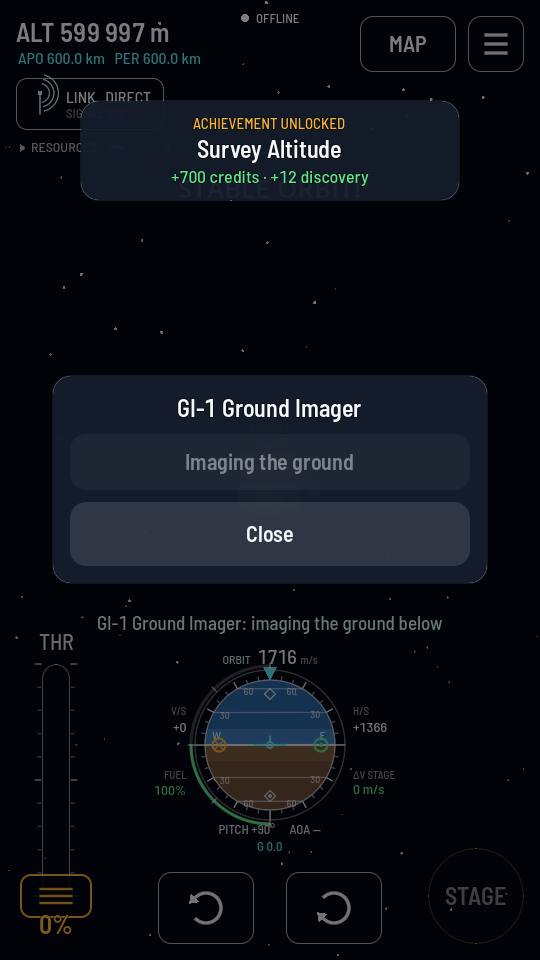
600 km over Earth: inside the band, and the camera is working. - Leave it there. The ground turns under the orbit, so the ship passes over every place in sight of home about once every hour and a half, and each pass has a 5 % chance of finding the point under it. Expect a point in a day or two on average, and a world's worth over several days. You can go back to the hangar or shut the game: a satellite in the band keeps imaging.
What you should see
The first time the camera starts imaging, a line on the flight screen says it is imaging the ground below. Over the following days, as points are found, a POINT OF INTEREST banner names each one and what it paid, and on the map each one's diamond on the world's edge is green. With the game shut, your phone is told instead, if you allowed notifications.
Note
The Moon's helium-3 deposits are points of interest, so a camera in the Moon's band finds them as well, with no landing. A deposit found this way can be mined at once: see Mine helium-3.
If it didn't work
- The sheet says too low or too high. The orbit dips out of the band. Burn at the apoapsis or periapsis that is outside it until both sit inside.
- The sheet says no power. The camera draws charge the whole time it is in its band. Add a solar array, deploy it, or a bigger battery for the night side.
- The sheet says no radio link. Nothing aboard can reach home from here. Fit an antenna, or put a relay in orbit so the link reaches round the world; see Keep a probe in contact.
- Nothing found after the first few orbits. That is normal: the camera finds a point on about one pass in twenty. Keep it powered and linked, and check back in a day or two.
- Points on the far side are never found. The satellite passes over them out of the ground station's sight. A relay of your own in orbit carries the link there.
- A point you expected was not found. Its survey contract may already have paid it out, or it was found before; a point is paid only once. Check the list of points of interest for which world it is on.
- In sandbox. Points of interest are found only in the shared world. See Switch to sandbox.
Note
A point found from orbit is found for good, and its survey contract is never dealt afterwards. If you want a survey's pay as well, take the survey and land on the point before the camera passes over it.