Mine helium-3
Land a Mining Rig, a Helium-3 Tank and their power on a deposit you have found, start the rig, and lift the tank to orbit when it is full.
You need this when you want helium-3, which is the only thing antimatter is made from, so it is the first step toward any warp: The first warp walks the whole route. Helium-3 and antimatter explains the chain this is the first half of.
- You own Helium-3 Prospecting, which sells the MR-4 Mining Rig and the H3-4 Helium-3 Tank. It is on tier 3 and needs Landing Gear and Ground Imaging first. The wide MR-8 and H3-8 come later, from Helium-3 Mining on tier 5; the steps are the same for both.
- You have found a deposit. Take its Prospect: contract and land inside the field, as in Find a point of interest, or photograph it from 190–210 km over the Moon, as in Image points of interest from orbit. In sandbox every deposit is open from the start.
- Your rocket can land the outpost on the Moon. An MR-4 is 900 kg and fits the 4 m stack; an MR-8 is 3.2 t on the 8 m stack. See Landing on the Moon.
Steps
- Build the outpost. In the hangar, open the ‹ Mining drawer and put the MR-4 Mining Rig in the stack, then an H3-4 Helium-3 Tank on it (an MR-8 and an H3-8 on an 8 m stack). The rig holds nothing itself, and helium-3 runs along every joint, so the tank can sit anywhere in the same ship. Stretch the tank with its Length slider to carry more.
- Give it legs. Hang Landing Struts on the rails down the rig's own sides, or on the tank's. The rig survives a touchdown of 14 m/s and no more.
- Give it power. A working MR-4 draws 0.24 u/s, which is one SP-6 Twin Array in full sun; an MR-8 draws 0.48 u/s, two. That is on top of whatever the pod or probe core draws. A running rig also empties the batteries every dusk before it stops, so the reaction wheels and instruments have nothing until sunrise. See Deploy a solar panel.
- Decide what leaves. Two ships on the ground cannot dock, so the tank that will go to orbit has to be part of this ship. Put it, with its own engine, fuel and command part, above a Docking Port or a Separator, and keep the rig, the legs and the arrays below the joint.
- Launch and fly to the Moon. The rig launches switched off and the tank launches empty.
- Find the field on the map. Tap MAP and zoom in on the Moon. A deposit you have found is the mint diamond on its edge, with the stretch of ground it covers traced beside it and, zoomed in, its name and grade: Serenity Field · Helium-3 ×1.
- Land inside it. Near the ground the field has a mast at its centre and a post at each edge. Anywhere between the posts is the deposit. Come to rest and stand still.
- Deploy the arrays. Tap each one and tap Deploy.
- Start the rig. Tap the rig and tap Start. A line on the flight screen says MR-4 Mining Rig started.
- Read its sheet. Tap the rig again. The greyed line names the deposit, its grade and how much of full work the rig is managing.
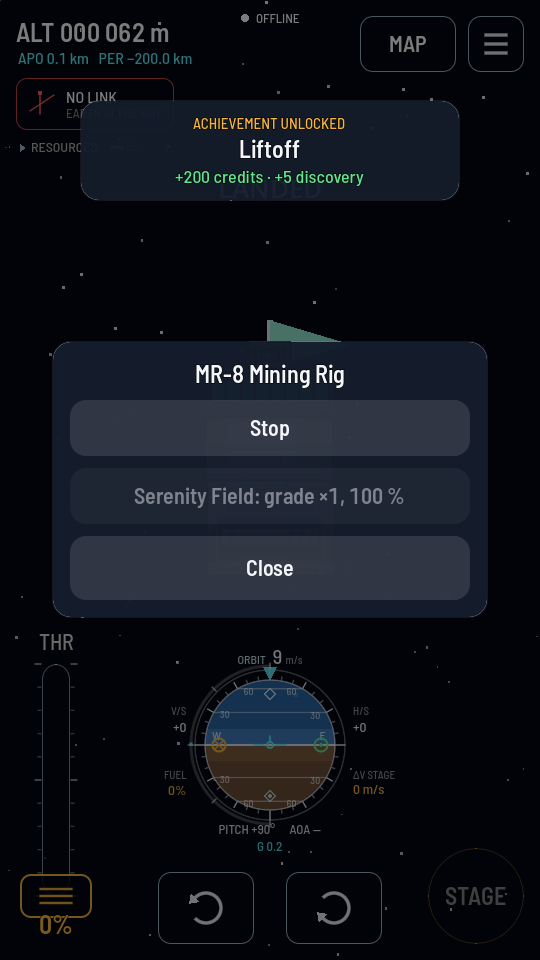
Working: the button now says Stop, and the line under it names the field, its grade and the share of full work. - Leave it running. An MR-4 makes 3 kg a day times the grade, an MR-8 8 kg, while it has power, and it goes on while you are in the hangar or the game is shut. On a grade ×1 field an MR-4 fills an H3-4 at its base length in 5 days, and an MR-8 fills an H3-8 in 7.5 days. When every tank is full it stops by itself.
- Lift the tank. Take control of the outpost again from the map, tap Stop on the rig, separate the upper ship and fly it to orbit. See Make antimatter for what to do with it there.
What you should see
The rig's line reads the field's name with a percentage, and the helium-3 row of the readout at the top left creeps up. The first time a rig of yours works a deposit on the Moon, the Moonshine achievement pays.
If it didn't work
- The sheet says No deposit here: survey one, or image it from orbit. Either the ship is outside the field's posts, or it is still moving. Landing inside the posts finds the field on touchdown; the rig ignores a field you have not found.
- The sheet says Nowhere to put it: every store is full. Every helium-3 tank aboard is full, or there is none. A full outpost draws nothing and waits for you to take the helium-3 away.
- The sheet says No power. The arrays are folded, or it is night. The Moon's day is 38.6 hours long and half of it is dark. The rig starts again by itself at sunrise.
- The percentage is under 100. The rig is getting part of the power it asks for and works that much slower. Add an array.
- Tapping the rig does nothing. Nobody is aboard and the radio link is down, so no part answers. The rig keeps doing what it was last told. On the near side the link comes and goes as Earth turns; the far side needs a relay. See Keep a probe in contact.
- The batteries are flat every night. A running rig drinks them dry at dusk before it stops. Tap Stop before nightfall if something else aboard needs the charge.
Note
You can switch Running on in the rig's properties sheet in the hangar instead. The rig then starts by itself the moment the ship stands still on a found deposit, with no tap and no radio link needed.