Warp a ship
Set a span, read the bill and the forecast, and form the bubble that carries your ship forward along its own orbit.
Use this to skip a coast: a four-day climb to apoapsis, a phasing orbit, the long empty middle of a transfer. Warp drives explains what a warp is and is not.
- You own Warp Theory at least, which sells the WC-4 Warp Coil.
- The ship has antimatter aboard, in an AM-4 or an AM-8 Antimatter Container. A container launches empty, so that antimatter came from your own mine: the first time, follow The first warp: mine its fuel below.
- The ship has radiators that can shed its heat into this drive's wall. See How many fins.
- The ship is in space, launched, off the ground and out of the air, and coasting with the engines shut down.
- Every part of the ship is inside the drive's bubble. Check it in the hangar before you fly: tap the drive and the circle is drawn round it. See Your ship has to fit inside the bubble.
The first warp: mine its fuel
No antimatter is sold, so before the first bubble comes the first mine. This is the route most programmes take to a radio probe that warps to Mars. The Mars leg costs the probe about 94 μg, which is two AM-4 traps; The first warp's fuel has the sums.
- Buy the small mine. With the Research Centre at level 3, buy Helium-3 Prospecting (the MR-4 Mining Rig and the H3-4 Helium-3 Tank), then Antimatter Containment (the AM-4 trap) and Antimatter Synthesis (the AC-4 Antimatter Converter). See Buy a tech node.
- Find a deposit on the Moon. Take its Prospect: contract and land inside the field, or photograph it from orbit with a GI-1 Ground Imager. The higher its grade, the sooner the fuel is made. See Find a point of interest.
- Land a rig on it and mine. An MR-4, an H3-4 and one SP-6 Twin Array in full sun. The Mars leg wants about 41 kg of helium-3: an H3-4 stretched to about 11 m, or three at their base length. See Mine helium-3.
- Lift the helium-3 to orbit in the upper half of the outpost, the half that sits above a Docking Port or a Separator.
- Convert it. An AC-4 in orbit with two AM-4 traps, two SP-6 arrays and a battery for the shadows. Dock the tanker to it and start the converter: 16 μg a day, so the two traps fill in about six days. See Make antimatter and Keep antimatter safe.
- Buy the probe's warp. With the Research Centre at level 4, buy Antimatter Power (the AR-4 reactor), Heat Rejection (the RW-3 Water Radiator) and Warp Theory (the WC-4 Warp Coil).
- Build and launch the probe. A Sat Controller, an AR-4 Antimatter Reactor, an RW-3 Water Radiator, the Warp Coil in the middle, a dish, solar arrays, a Docking Port and two AM-4 traps. The traps launch empty.
- Fill it. Dock the probe to the converter's ship, tap one of the probe's traps, and move the antimatter across with Transfer resources, like any other load. See Transfer resources. Or build the converter into the probe itself and dock the helium-3 tanker to that: its own traps fill, and the converter rides along to Mars.
- Fly the leg. Burn onto the transfer to Mars, then warp the coast with the steps below, up to 30 days at a time and never past the edge of a world's sphere of influence.
Each step pays as you go: the first rig to work the Moon earns Moonshine, the first converter Anti-Hero, and an AC-4 working round the Moon Home Brew. See Achievements.
Steps
- Get the orbit you want to skip along. A warp takes you forward on the orbit you are already on, so make the burn first. Raising the orbit also makes the bubble cheaper to light: the charge to form it falls the further you are from a world.
- Tap the drive. Its sheet opens with a Skip slider, read in hours for a Warp Coil and days for a Ring or a Lattice, a greyed line saying what the current span would cost, and one button reading Warp and the span. Drag the slider and the button and the bill follow it as you go; its left-hand end is the shortest skip the drive will make, never zero.
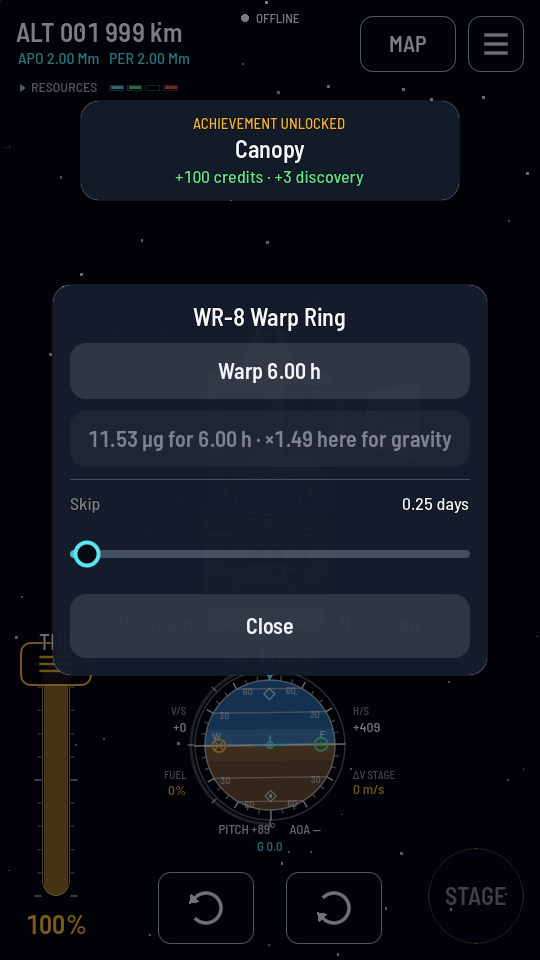
The greyed line is the whole bill, including what gravity adds to the ignition. A drive starts on the shortest span its slider can show — a quarter of a day here — and keeps whatever you set it to. - Wait for the windings if they are cold. The button is dead while the drive charges and the line reads Windings at 60 %. A Coil takes 30 s, a Ring 60 s, a Lattice 120 s from the moment it has power.
- Tap Warp. The Warp sheet opens. This is where the jump is actually made, and nothing has happened yet.
- Set the span exactly. The slider, the two moment buttons and the Fine tune field are three hands on one span, and each of them moves the other two. Tap To apoapsis or To periapsis to land on one of your orbit's own moments; the field then reads that span, in minutes round a low orbit and hours round a high one, and its − and + buttons step it a notch at a time — which is how you arrive just short of a moment, with the burn still ahead of you. The slider is the coarse hand and its scale is a ratio, so the middle of the track is hours and the far end is weeks. All three stop at whichever is shorter: what the drive will hold, or what your antimatter will pay for.
- Read the bill. "3.4 μg to form the wall + 90 μg to hold it = 93 μg of 170 aboard". If a second line says the ignition is multiplied here, that is gravity, and raising the orbit is what lowers it.
- Read the forecast, line by line. Under the bill is every load aboard and what it will be when the wall opens. If a red line above them reads 2 parts are outside the wall and will be destroyed, stop: the wall cuts what it does not contain, and those parts and anyone in them are gone the moment it closes. A load that reaches zero on the way is red and says when: Electricity — runs out after 101 min. Shorten the span until nothing is red, or go back and fix the ship.
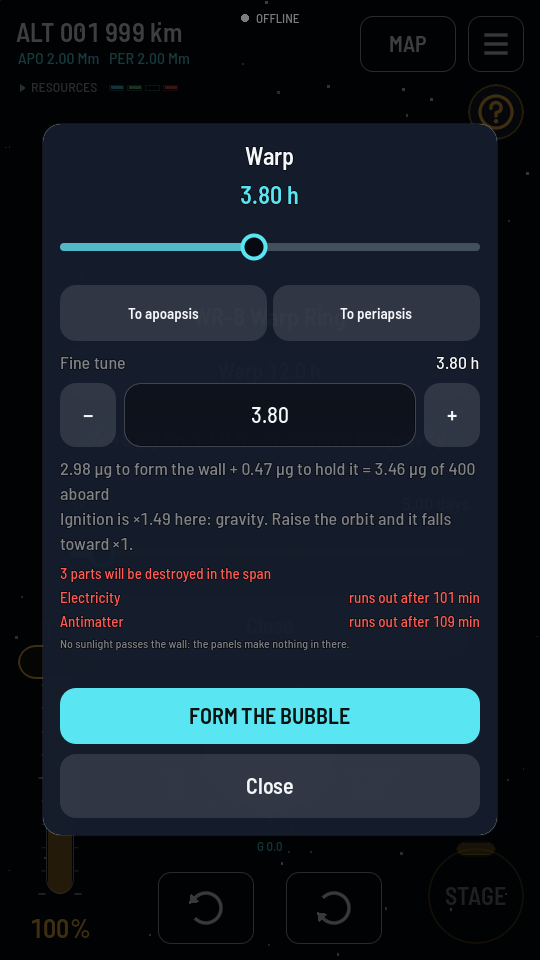
To periapsis set this span and one tap of − walked it back off the moment. This ship's reactor has nobody to run it, so the batteries last 101 minutes of the 3.8 hours; with them flat, the antimatter container loses its power and goes up a few minutes later, taking two parts with it. Every red line here is one to act on. - Tap FORM THE BUBBLE. The sheet closes and the wall goes up: a shell of light races out from the drive to the bubble's own size and stands there. Your ship goes once it is closed. It opens again a moment later, falling back into the drive — and by then you are somewhere else on your orbit.
What you should see
The wall itself, drawn at the size the drive's card gives and centred on the drive itself: thirty metres across for a Coil, forty-five for a Ring, a hundred and seventeen for a Lattice. It closes round the ship, it is there while the jump is made, and it opens at the far end — which is the only thing there is to see, because nothing else about the ship changes. The map shows your ship at a new point of the same orbit, with the same apoapsis and periapsis it had before. The world's clock reads what it read a moment ago, and every other ship and world is where it was. The readout shows a span's worth of food eaten, charge drawn and antimatter spent. The first bubble you close pays the Nothing Ages But The Ship achievement.
If it didn't work
- The button under the span is greyed and the line says the windings are at a percentage. The drive is still charging. Wait.
- The line says No power: the windings are down. The drive has no charge to draw. It needs 0.02 u/s for a Coil, 0.08 for a Ring and 0.25 for a Lattice just to stay ready.
- The Warp sheet's button will not press. An amber line above it says which rule stopped the jump. When it refuses lists all of them and what to do about each.
- The line above the button reads Working out the span… The sheet is living the span through on your ship before you commit to it. On a big ship, or one with a crop growing, that takes a moment. The button comes back when the forecast is in.
- The ship came out of the bubble missing parts. They were outside the wall when it closed, and the wall cuts. Nothing recovers them. Move the drive toward the middle of the ship — the hangar draws the circle round a selected drive and names what falls outside it under the mass.
- A row in the forecast is red. That load runs out inside the span, and nothing aboard can be saved once the wall closes. Shorten the span, add storage, or fit an antimatter reactor — the AR-4 on a probe, the AR-8 on a crewed ship — which is the only source of power that works in there. It burns antimatter from the same containers as the bill, so check that row too.
- Antimatter is red, and Electricity with it. The bill and your reactor drink from the same containers: the bill when the wall closes, the reactor for the rest of the span. Run dry between them, the reactor goes cold before the wall opens and the batteries follow it down. Shorten the span until the Antimatter row is a plain figure, or carry more antimatter. See Nothing happens until the sheet has said what will.