Buy a tech node
Spend discovery on the tech tree and put a new set of parts in your hangar palette for good.
You need this whenever a rocket wants a part you have never seen in the palette: a separator, a heat shield, a landing strut, a bigger engine.
- You are in the shared world, not sandbox. Sandbox shows the tree your account really holds, but nothing on it can be bought there.
- You are signed in. Off the network the card says so and the button will not tap.
- You hold the discovery the node costs.
- You already own every node it requires, and your Research Centre reaches its tier.
Steps
- Open the Space Center. From the hangar, tap the Space Center button (the dome on the bottom bar).
- Tap the Research Centre. Drag the strip sideways or tap ALL to find it. The building's sheet opens below the strip.
- Tap Open tech tree on the sheet. The tree fills the screen, with your discovery and credits in the top right corner.
- Find the node. Drag the grid with one finger and pinch to zoom, or tap Fit in the header to pull back to the whole tree at once.
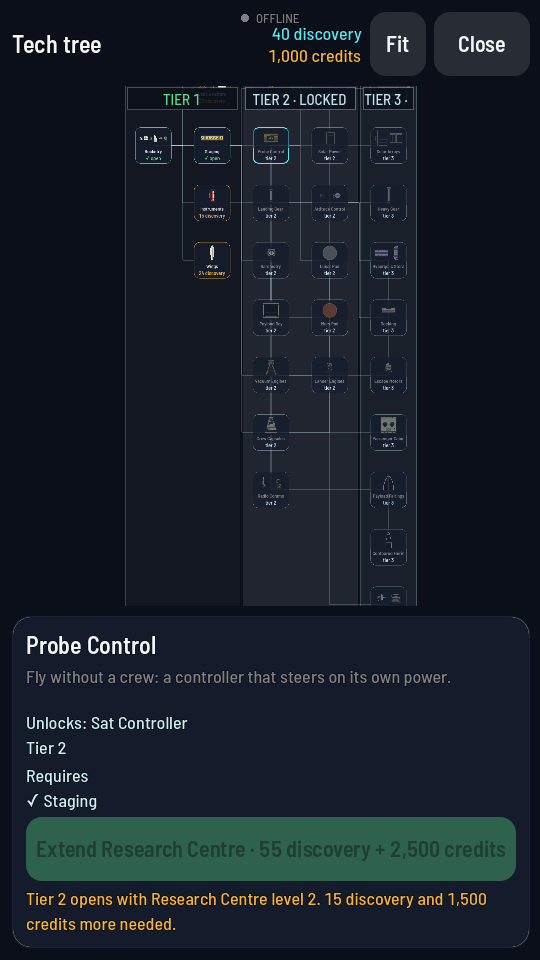
After Fit, every node is on screen. The tier bands are the five vertical stripes. - Tap the node. Its card opens along the bottom: the node's name, what it does, the line "Unlocks:" naming the parts it sells, its tier, and a Requires list marking each thing it wants first with + for one you have and · for one you do not.
- Tap the green button, labelled with the price. It reads Unlock followed by the cost, for example 40 discovery. The line under it reads "Unlocking…" while the purchase goes through.
What you should see
The tile turns green and its label changes to "open". The lines out of it light up green, the figure in the top right corner drops by what you paid, and the card's button reads Unlocked with "These parts are in your palette." under it. Tap Close twice to get back to the hangar and the new parts are in their category drawers.
Why the button won't tap
The line under the card always says why. Each of these is the game's own wording:
| What the card says | What it means |
|---|---|
| "Needs Staging first." | You do not own a node this one requires. It names them all. Buy those first; the Requires list above shows which are marked + and which ·. |
| "Tier 2 opens with Research Centre level 2." | The node's whole band is closed. The button has turned into that extension, priced and bought right there, so you do not have to go anywhere else. |
| "40 discovery more needed." | You are short on price alone. Where both are short the line names both: "15 discovery and 1,500 credits more needed." |
| "Offline — the server keeps your progress." | You are not signed in. Nothing can be bought until you are. |
| "Sandbox: the tree stays as the shared world has it. Leave sandbox to unlock." | You are flying in sandbox. Switch back to the shared world in Settings to spend anything. |
Heads up
A closed tier and a missing node can show at once: the line leads with the tier, then names the node the extension itself is waiting for.