The tech tree
Every part in the game is sold by one node on the tech tree, and discovery is what buys nodes. This is where a career turns from one rocket into a fleet.
What it is
The tree is a grid of nodes, joined by lines that say which one comes before which. Buying a node puts its parts in your hangar palette for good. Nothing else does: a part you have never seen in the palette is a part whose node you have not bought yet.
The quickest way in is the branching mark at the foot of the parts column in the hangar. It is also in the Space Center: tap the Space Center button (the dome) in the hangar, tap the Research Centre, and its sheet has Open tech tree on it. The tree is far wider than a phone, so you drag it with a finger and pinch to zoom; Fit in the header pulls back to the whole thing at once, and Close returns to the Space Center.
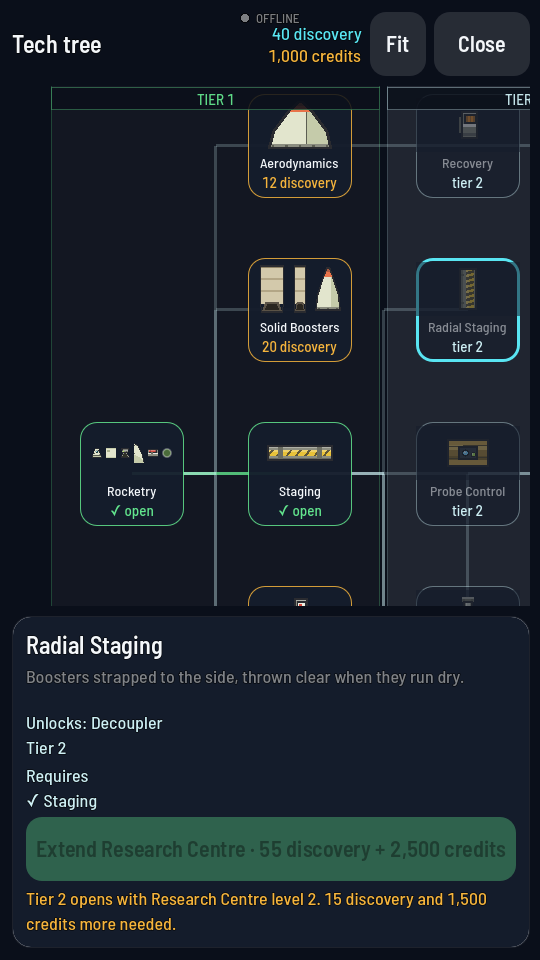
What a node costs
Every node is priced in discovery, the currency that buys nothing else. Aerodynamics, the cheapest, is 12 discovery; Warp Lattices, the dearest, is 190 discovery. The whole tree comes to 4,516 discovery if you buy every one of the 71 nodes.
One node, Rocketry, is free and you already hold it the day you start. It sells the Command Pod, the Fuel Tank, the Engine, the Fin and the Parachute, which is exactly the rocket the game opens with.
Where discovery comes from is a subject of its own: see Credits and discovery. In short, feats and readings pay it and nothing else does.
Tiers, and the Research Centre
The tree is banded into five tiers, drawn as vertical stripes with TIER 1 to TIER 5 written over them. Your Research Centre's level decides how many of those bands are open: level 1 opens tier 1, level 2 opens tier 2, and so on up to level 5. Tier 3 includes the small helium-3 mine, tier 4 is the probe's warp drive that burns what the mine makes, and tier 5 is the wide stack with the wide mine and the crewed drives. A band you have not opened says TIER 2 · LOCKED across the top and every node inside it is dim, whatever else you have bought.
Tapping a node in a locked band does not waste your time. Its card's button turns into the Research Centre's next extension, priced and bought right there, so the tree never sends you to another screen to open the band you are looking at. The level prices are in the Buildings reference.
What a node needs first
Most nodes name one or two other nodes you must already own. The card lists them under Requires, each marked + if you already have it and · if you do not, so a node you cannot buy tells you the whole way to it in one glance. The whole list turns amber while anything on it is outstanding. The lines on the grid are the same information drawn: a line lights up green once the node it leads to is yours.
Every node sells parts. None sells a place to launch from: the one Launch Pad is on Earth, and it is a Space Center building you upgrade, not a node you buy.
What buying one changes
The tile turns green and reads "open", the lines out of it light up, and the parts appear in the palette on the spot. The card then says "These parts are in your palette." There is nothing to fit, install or launch first; the node is bought once and it is yours until you start the tree over.
Starting the tree over
A tree bought one way can be given back and bought another. Reset in the tree's header resets it for gems (the price is on the sheet's button), at most once every 7 days. Every node but the first goes back to locked, every Space Center building goes back to level 1, and all the discovery they cost comes back to you, at today's prices.
The rest of your programme is left where it was: your credits (apart from contract advances), crew, achievements and programme missions stay. Your ships in flight keep their parts. A building level you had before is built again for its discovery alone, without credits, once its tech is researched again. The contract board starts over: contracts under way end and their advances are taken back, so a reset waits until you hold those credits. The hangar goes back to the basic rocket, and designs with parts you no longer have stay out of the lists until you research those parts again.