The Space Center
Your buildings on Earth, beside the one Launch Pad: a strip of buildings you own, each with levels that cost credits, sometimes discovery, and sometimes a tech node first.
What it is
Open the Space Center from the hangar's Space Center button, the dome on the bottom bar. Its title reads Space Center · Earth. It shows your buildings drawn along the ground, with a sheet below for whichever one you tap: its level, its figures at that level, what the next level changes, and what upgrading costs.
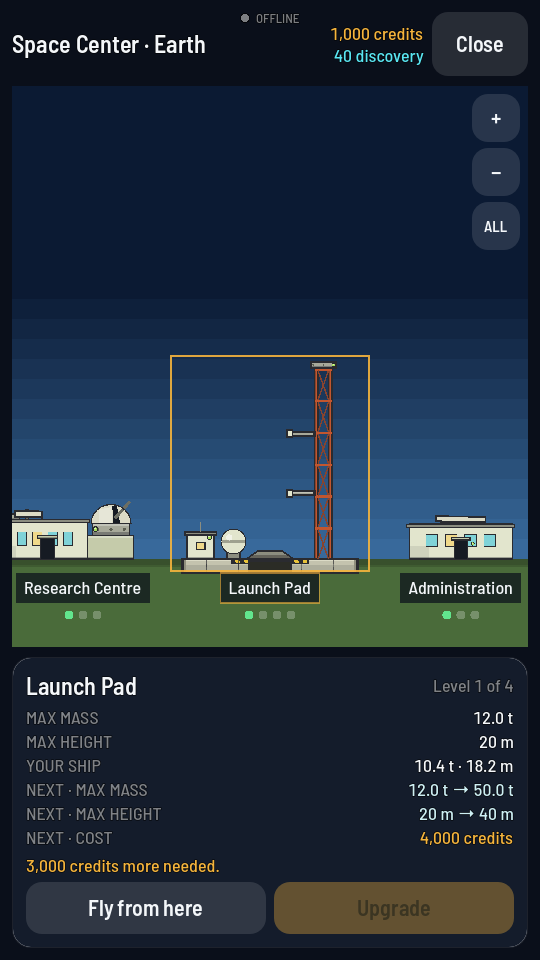
Upgrading a building is one action with steps of its own: see Upgrade a building.
Moving around the strip
Your buildings stand further apart than one screen is wide, so the strip is something you move around rather than a fixed picture. Drag it sideways with one finger to walk along the ground, and drag it up and down to look at the top of the Launch Pad's tower. Pinch to zoom, or use the buttons in the top right corner: + and − step the zoom, and ALL pulls back far enough to show every building at once. Tapping a building selects it and brings it into view; dragging never selects anything.
Each building is named on a plaque on the ground below it. Zoomed out, the names shorten to fit the room they have, and the selected building's plaque is the one ringed in amber — its full name is always at the top of the sheet below.
Every building stands once, on Earth
You hold one of each building and one level of each, for your whole game, and every one of them stands on Earth. No other world has a Space Center.
Launch Pad: where every rocket starts, the only one in the game. A bigger pad takes a taller, heavier ship, and lays a longer runway beside it.
Comm Station: the home station, and the only one — a dish on Earth that is the ground end of every radio link. Anything out of Earth's sight is reached through relay satellites of your own; levelling the station up lifts every antenna already in orbit, and from level 2 it puts other players' ships on your map.
Research Centre: turns discovery into parts. Each extension opens the next tier of the tech tree.
Administration: where companies come to buy flight tests. Each extension takes on more contracts at once, and harder ones.
Astronaut Center: where the Meek sign on. Each extension holds more of them at once, and opens more trades to the board.
What a level costs
Every building's next level is priced in credits, and some levels also ask for discovery. A few levels, mostly on the Launch Pad and the Comm Station, are locked behind a tech node: buy that node first, then the level is buyable. Extending the Launch Pad from its first level to its second, for example, costs 4,000 credits once you already hold the node it needs. The full price of every level, and the node each one needs, is in the Buildings reference.
One pad, and nowhere else to start
Every building stands from your first day at level 1, the Launch Pad included, so a new pilot always has somewhere to fly from. The hangar's Fly goes straight to it. Landing on the Moon or Mars never builds a pad there: a ship on another world arrived by flying, and leaves the same way.
The runway beside the pad
The Launch Pad has a runway: a strip of flat ground east of the tower, where a ship standing on landing gear starts instead of on the pad. It belongs to the pad, so it has no level of its own. Every Launch Pad level lays it longer, from 300 m at level 1 to 2400 m at level 4, which is room for a heavier aeroplane to reach flying speed. On the runway a ship is held to the pad's own caps: its mass, and its height read as the longest ship the runway takes. The figures for every level are in Buildings, and how an aeroplane uses the strip is Aeroplanes.