Upgrade a building
Turn a Space Center building's next level into your own: a taller Launch Pad, another tier on the tech tree, more room on the Administration's board, more Meek, or a longer antenna reach.
You need this when your ship no longer fits the Launch Pad, when the tech tree's next tier is still closed, when the Administration has no free slot for a contract you want, when the Astronaut Center's roster is full, or when a probe has fallen out of the Comm Station's reach. The Comm Station stands on Earth alone, so its sheet is on Earth's strip.
- You are in the shared world, not sandbox. Sandbox shows you the Space Center you really own, but nothing on it can be bought there.
- You are signed in. Off the network, the sheet tells you so and the button will not tap.
- You hold enough credits, and enough discovery on the levels that ask for it.
- A level that names a tech node is bought only after that node is.
- A level you had before a tech tree reset costs only its discovery, no credits.
Steps
- Open the Space Center. From the hangar, tap the Space Center button (the dome on the bottom bar). The title reads Space Center · Earth: every building you own stands there, once.
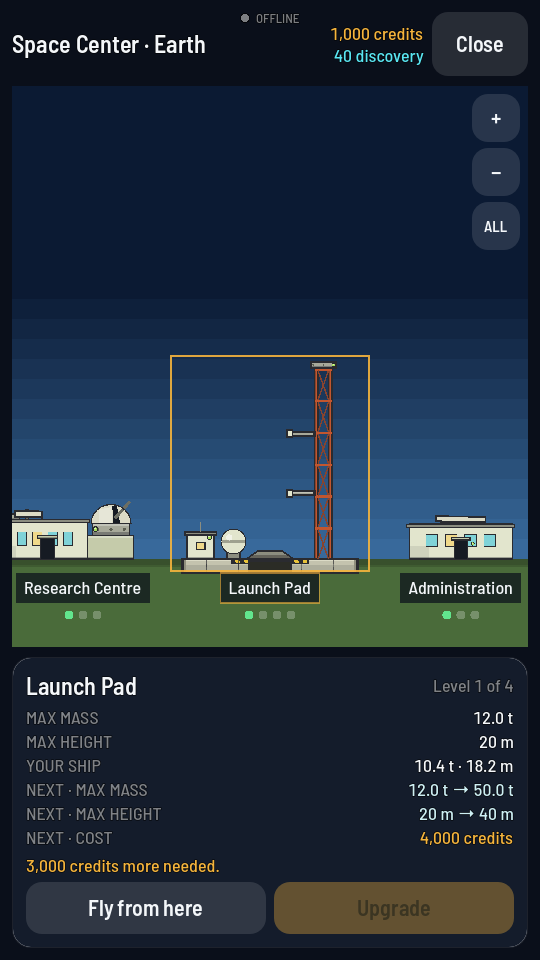
One strip, every building; the selected building is ringed. - Find the building and tap it. The strip is wider than the screen: drag it sideways to reach the rest, or tap ALL in the top right corner to pull back and see every building at once. Its sheet opens below the strip: the building's name, its level, its figures at that level, and what the next level changes, marked "NEXT ·" in front of each row that moves.
- Read the price, then tap Upgrade. The last row of the sheet, "NEXT · COST", is what the next level costs — for example 4,000 credits, or a mix of discovery and credits such as 35 discovery + 3,000 credits; a level you had before a tech tree reset shows its discovery alone. The Upgrade button sits along the bottom of the sheet, beside the building’s own action where it has one. While the game buys it, the line under the sheet reads "Building…".
What you should see
The building's level pips along its name fill in one more, and the sheet's figures move up to match. The "NEXT ·" rows point at the level after that, or disappear if you just reached the top.
Why the button won't tap
The line under the sheet always says why. Each of these is the game's own wording:
| What the sheet says | What it means |
|---|---|
| "Not built" | The game has not received your buildings yet. Every building stands from your first day; the sheet fills in once the game reaches your account: "It stands once the server has sent your record." |
| "Top level" | The building is already at its highest level. "Nothing left to extend here." |
| "Needs Staging first." | The next level is locked behind a tech node. This is the Launch Pad's second level. Buy the named node on the tech tree, then come back. |
| "Too big for this pad: …" | Only the Launch Pad says this, and only about the ship sitting in the hangar. It names what is over the limit, for example your ship's mass against the pad's own 12.0 t cap at its first level, or its height against the 20 m the same level allows. |
| "3,000 credits more needed." | You are short on price alone. The line names exactly what is missing, discovery and credits both when both are short: "105 discovery and 7,800 credits more needed." |
| "Offline — the server keeps your progress." | You are not signed in. Nothing can be bought until you are. |
| "Sandbox: this is the space center the shared world holds. Leave sandbox to spend on it." | You are flying in sandbox. Switch back to the shared world in Settings to spend anything here. |