Your account
What is kept under your account, how you sign in, how a second device joins your space program, and what still works when the game cannot reach the shared world. Install and sign in is the short version; this is the whole of it.
The account is the space program
You sign in with Google, with Apple, or with an email and a password, and your whole space program — the credits, the tech, the buildings, the Meek, the ships and the fleet — is kept on the shared world under that sign-in. The first time the game opens it asks which you want, and the same sheet offers Play in sandbox, which needs no account at all (below). Once you are in, you stay in: the game keeps a session of its own on the phone for a month at a time and renews it quietly, so you are not asked again.
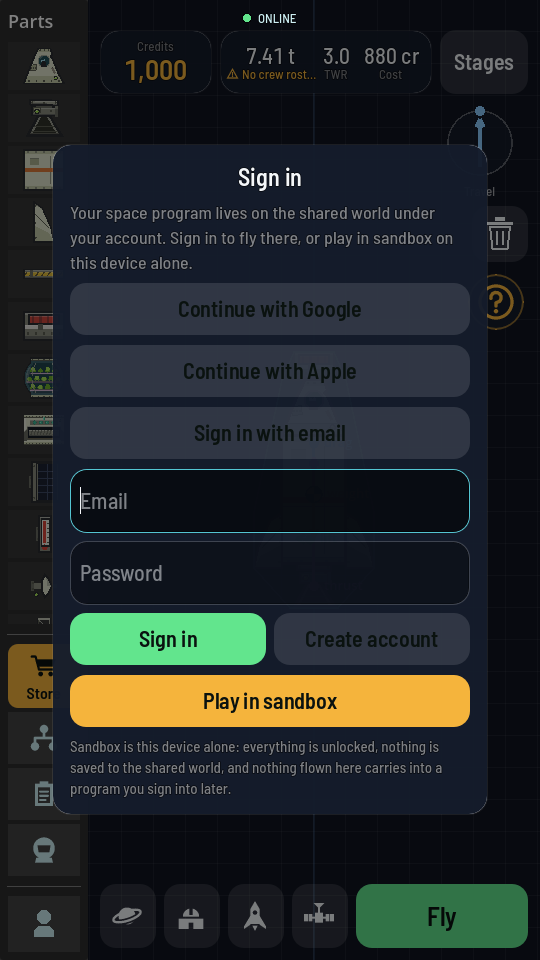
Continue with Google and Continue with Apple open a browser over the game. On an iPhone, iOS first asks whether Orbital Frontier may use orbital-frontier.world to sign in: tap Continue. When you have finished, the browser hands you straight back to the game, signed in. If your phone's browser asks first, tap Back to Orbital Frontier. On a computer the sign-in happens in your own browser, which then says you can close the tab. And if you change your mind on a phone, simply close the browser yourself: the sheet comes straight back with its buttons live, so you can pick a different way in. On a computer, tap Cancel on the sheet instead.
An email account has to prove the address is yours before it opens a program. When you tap Create account, or sign in with an address that was never confirmed, the game sends a link to that address and the sheet shows Check your email. Open the link on any phone or computer, then come back and tap I've confirmed it. If the email has not arrived, look in your spam folder or tap Send the link again. Typed the wrong address? Use another email takes you back to the sign-in buttons. Until the address is confirmed you can still Play in sandbox, and if you close the game after tapping the link, it signs you in by itself the next time it opens. Google and Apple sign-ins are never asked this, because those accounts have already proved their address.
Settings, from the small figure at the foot of the hangar's parts column, has an Account section that says who you are signed in as and by which door, shows your pilot rating, and holds your Visible name, Sign out, the code (next), Reset account and Delete account. While an email address waits on its link, the section says Email not confirmed with the address, and Sign in there brings back Check your email.
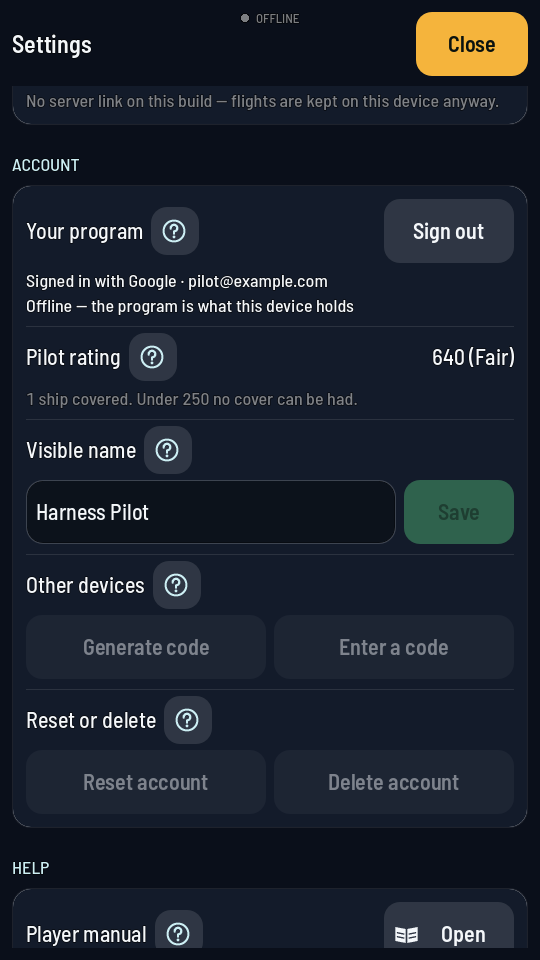
Pilot rating is the figure that prices your insurance cover: the number, its band (good, fair or poor) and how many of your ships hold cover right now. The line under it says what moves the rating and the floor under which no cover can be had (nor any player contract taken); under that floor the line turns amber. The row is not there in sandbox, where nothing you fly can move it.
Visible name is the name you go by: type it and tap Save (up to 32 characters; leave it empty and save to clear it). It is kept with your account, so it follows you onto every device you sign in on, and starting over with Reset account keeps it. Saving needs a connection, and the field is not there while you play in sandbox. A name with a swear word or another rude word in it is not saved: the line under the field says so, and you keep the name you had.
Playing on another device: the code
Signing in on a second phone with the same Google or Apple account brings your program with it. Signing in there with a different account — Google on one, Apple on the other — would start a second program, so there is a way to join the one you already have. The Online Pass belongs to the program that bought it, so a second sign-in on the same phone that finds the Pass already taken joins that program the same way:
- On the device that has the program, open Settings and tap Generate code under Account, on the Other devices row. A six-character code appears with a countdown: it is good for one minute and one use, and then it is gone on its own.
- On the new device, sign in however you like. The sheet then asks whether you already have a program elsewhere; type the code there, or later from Enter a code under Account. Either way, Join first tells you what the program you are leaving holds and asks for a second tap.
- The new device's sign-in now opens your program, on that device and on every other one it is used on. Both sign-ins open the same program from then on.
The code is only ever shown in Settings, and a new one replaces the last. Read it out across the room if you like: it never contains a 0, an O, a 1 or an I.
Starting over
Reset account under Account begins the program again from nothing, and keeps the account itself. Everything you have flown for goes — your credits and discovery, every tech node, every building above its first level, your Meek, your achievements, the places you surveyed, your saved designs and every vessel in the world — and what you get back is what a new player holds: the starting credits, the root tech, a launch pad on Earth and one founding astronaut. Your gems are the exception: they stay just as they are, and a new player's 100 are not given again. You stay signed in and the code you may have shared with another device still opens the same program.
Your phone lets go of the program at the same moment, so nothing of it is left lying about: the ship on the hangar's canvas goes back to the starter rocket (the one you were building was made of parts the new program has not discovered), the reminders you had set go with the ships they were set against, a flight you had left part-flown is not handed back, and the guided walks come round again for the new player you now are. Every achievement is there to be earned a second time, and pays a second time.
It asks first, in a sheet that names what will go, and there is no way back from it once you tap Reset. You can start over up to five times in any seven days; ask a sixth time and the sheet tells you the day the next reset is yours. It needs a connection, and it is greyed out while Sandbox is on (below) — the record is only read there, never written.
Deleting the account
Delete account under Account goes further: it removes your program from the shared world — every ship, every Meek, every credit, on every device — and the sign-in with it, so there is no account left to sign back into. It asks twice. There is no way back from it either.
What is kept under it
Everything you earn, buy, build, hire and fly, in one place:
| Kept | What that means |
|---|---|
| Visible name | The name you go by, if you have typed one under Account. |
| Credits and discovery | Your two earned balances. See Credits, discovery and gems. |
| Gems | The 100 every new player starts with and the ones you bought in the Store. Starting over keeps what you hold and adds none. See Gems. |
| Tech nodes | Every node you have bought, and so every part in your palette. |
| Buildings | Each building at its level, at your Space Center on Earth. |
| The Meek | Your roster, the recruit board they were drawn from, and the memorial of the ones you lost. |
| Ship library | Every rocket you saved from the hangar, by name. |
| Your fleet | Every ship of yours still out there, parked or in orbit, and where it is right now. |
| Achievements | Which feats you have done, so none of them ever pays twice. |
| Readings log | Every measurement you have filed. See Science readings. |
| Contracts | The jobs you have under way with their deadlines, and the ones already settled. |
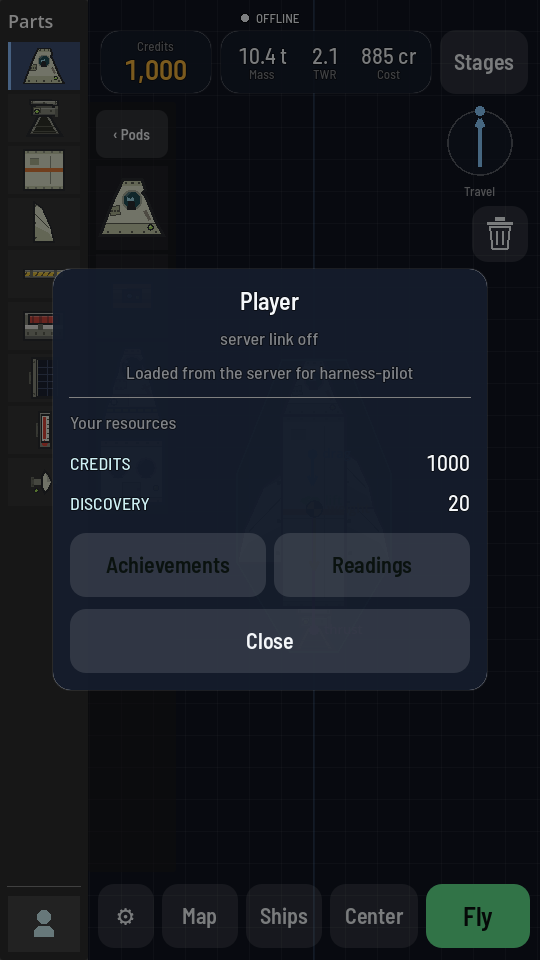
Your credits and discovery are on the purse, the chip at the top left of the hangar. Tapping it opens the Your purse sheet, which says what each currency buys and where it comes from, and has the way through to Achievements and Readings.
The ship library
A rocket you build is a design, not a flight. Saving one from your ships (the rocket on the hangar's bottom bar) keeps it under your id by name, so it is in the list on any phone you sign in on, and it stays there whether or not you ever fly it. Loading one puts it back on the canvas exactly as you saved it. Nothing about a saved design costs credits: you pay when its first stage lights.
The ship on the hangar's canvas is kept on your phone as you build, saved or not, so the hangar opens on it next time. It belongs to the program that built it, and signed-out play counts as one of its own: Sign out, sign in from signed-out play, or sign in to another account, and the canvas goes back to the starter rocket, since the ship you were building may be made of parts the next program has not discovered. To keep it, save it to your ships first (the rocket on the bottom bar): a saved design stays in your account's list, and the ones you save while signed out come with you when you sign in.
Other players can see a ship's name, so a name with a swear word or another rude word in it is refused wherever you type one — saving or renaming in your ships or your sub-assemblies, the Ship name field on a command pod, and Rename ship in flight or on the map. The game says why under the field and keeps the old name; pick another one and save again.
A new game does not start with an empty list. The first time you open the game on a phone, and again when a new account is made or you start your program over, the library already holds a few ready-made rockets to fly or take apart. They are ordinary designs from then on: rename them, rebuild them or delete them, and they never come back once you have. A ready-made rocket you never changed stays with signed-out play when you sign in to an account, since a new account comes with its own copies. A ready-made rocket built with a part you have not discovered yet — a heat shield before the tech tree reaches it, say — waits off the list and appears once you have the part.
Your sub-assemblies (the satellite on the bottom bar) work the same way. A new game can find a few ready-made pieces there, such as a satellite to put on a rocket, at the same moments as the ready-made rockets. They are yours to add, change or delete like a piece you saved, a deleted one does not come back, one you never changed stays with signed-out play when you sign in, and one made with a part you have not discovered yet stays off the grid until you have it.
Sandbox reads it and never writes it
With Sandbox on, you fly with the credits, tech and buildings your account already holds, and none of it moves. Nothing is charged, nothing is unlocked, nothing is built, no reading is filed and no contract is judged, however the flight goes. The ships you launch there stay on that one device.
What sandbox keeps on your phone
Sandbox has a small save of its own, on this device and nowhere else. It is the same one whether you are signed in or not, and the shared world never looks at it. It holds three things:
- Its achievements. A feat done in sandbox is unlocked there, with its own toast, but it pays nothing and stays locked on your account until you do it in the shared world. See Achievements.
- The discovery those feats would have paid, as a tally you can see but never spend: the tech tree still cannot be bought from in sandbox.
- Its own Meek. Sandbox flies a crew of its own rather than the one on your account (the Meek already aboard a ship of yours come along with it as guests): up to 5 of them, signed on for free, counted whether they are on the ground or in flight, with a Lost tab of their own. Lose one and another of the same trade signs on in their place at once. See The Meek.
Leaving sandbox puts your account's own crew, achievements and discovery back, exactly as they were. The sandbox save stays until you delete the app, and deleting the app deletes it: nothing brings it back.
Signed out, you are in sandbox whether the switch says so or not — the shared world needs a name on everything it is asked, and there is none. A signed-out sandbox hands you a young program rather than the whole game: the tech tree up to tier 2, a level 3 launch pad (of four), every other building at its top level, credits that never run out, and a founding astronaut to fly with. There is no discovery to spend in it and nothing can be unlocked there — the rest of the tree, and the pad that lifts the mass and height caps altogether, are earned in the shared world, signed in. None of it carries into a program you sign into later, except the designs.
Designs are the exception, because a design is not progress: a rocket you save in the hangar while sandboxed is saved for good, and the rockets you designed before signing in come with you when you do (all but the ready-made ones you never changed). Switch to sandbox covers the switch itself; turning it off with no sign-in opens the sign-in sheet, and the switch flips the moment you are in.
With no connection
The game keeps its own copy of the parts and the way they look, so the hangar opens and flies with nothing to talk to. What it cannot do is move anything that belongs to your account. A launch cannot be charged, so it is not refused for money it cannot check, and a tech node cannot be bought at all.
Nothing you do offline is thrown away. An achievement you earn is kept on the phone and paid the next time the game reaches your account, marked reward pending until then. A reading you take is kept and filed the same way, and so is a ship you save. The small chip at the top of the screen says which of these you are in:
| The chip says | You are |
|---|---|
| LIVE | In the shared world, with a line held open to it: what another of your devices does, or what the world does to your ships and contracts while you watch, reaches this one at once. The figure in brackets, as in LIVE (42 ms), is how long a message takes to reach the server and come back, measured every few seconds: under a hundred is a good line, several hundred is a slow one, and a save still gets through either way. |
| ROOM | LIVE, in flight, while another ship of the world is beside yours in space: the world is following this stretch of your flight move for move, because what happens between two ships is its business. The four characters after the word, as in ROOM K7QX (42 ms), name this meeting: every pilot in it sees the same ones, so two players can tell they are flying in the same room, and a new meeting gets new ones. Nothing about flying changes, and it goes back to LIVE when you are alone again. |
| ONLINE | In the shared world, with your account to hand, asking for news every half minute rather than being told. It turns to LIVE on its own. |
| CONNECTING | Reaching for it. It falls back on its own. |
| OFFLINE | Playing on this phone alone. Everything that must wait, waits. |
| SANDBOX | In a world of your own, where nothing is written back. |
Between those, the chip briefly names what the game is sending and whether it got through: SAVING then SAVED for a ship, LAUNCHED, CONTRACT COMPLETE, PURCHASE CONFIRMED. A word ending in FAILED or NOT CONFIRMED is only about that one thing; the rest of your game is saved as usual.
The About list at the bottom of Settings says the same thing in words, along with which build you are running. Check the About list is how to read it.