The shared world and its clock
Everyone flies in one solar system on one clock, and that clock runs whether or not the game is open. This page is why a rocket you left in orbit is further along when you come back, and why one you left in the air is sometimes gone.
One clock, and nobody's hand on it
There is one shared world: the same sun, the same planets and moons, the same time of day on every phone playing. That time is the world clock, and it is the clock your orbits are worked out against. The map shows it in the top left as a T+ line, counting how long the world has been running.
No player can move it. There is no pause and no fast forward, because a minute you skipped would be a minute somebody else lived through. Waiting is therefore part of flying: an apoapsis four hours out arrives in four hours. What you can do about that is set a reminder and put the phone down, or turn sandbox on and fly a world of your own, where time warp lives.
The map says so before you commit. Every countdown on it is real time, and in the shared world the time of day stands beside it — a tapped point reads T-7:24:00 · tomorrow 06:12, and a maneuver node whose plan crosses into another world's pull carries an ARRIVES line saying when, in days and by the clock, so a transfer is priced in your evenings before the burn is made. When a transfer burn finishes with the crossing hours away, a toast offers the reminder there and then; tap it and the lead picker opens.
How long a trip takes
Everything past the Moon is a calendar event. These are the waits with no warp drive aboard, for a ship leaving a low Earth orbit on the cheapest transfer, in the real days the world clock will count them in. The window is how long between two chances to leave; miss one and the next is that far off. The last column is what the same leg costs a probe carrying a Warp Coil, in micrograms of antimatter and in the days one small mine on the Moon's richest field takes to make them, which is the game's way of paying for a wait instead of sitting through it.
| Leg from Earth | Real time | Window | Skipped by a Coil probe, and mined |
|---|---|---|---|
| One orbit at 100 km | 33 min | — | watched, not skipped |
| The Moon | 7.4 h | every orbit | an evening; no drive needed |
| Twostrokes, Existence | 31–43 days | 34 / 170 days | 38–53 μg: 5–6 days |
| Mars | 76 days | 228 days | 94 μg: 11 days |
| Schmeckle, Flurbo | 116–138 days | about 140 days | 145–172 μg: 18–21 days |
| Meeseeks Prime | 291 days | 116 days | 364 μg: 44 days |
| The Box | 1.8 years | 110 days | 811 μg: 98 days |
| Cronenberg, Squanch | 4.7 / 8.9 years | about 107 days | 2,142 / 4,080 μg |
| Pluto | 13.3 years | 107 days | 6,068 μg |
A moon of another world is its planet's leg plus a few hours. A faster transfer than the cheapest one buys days with fuel, and the reference ships of the tech tree's early tiers do not carry it. So the honest reading of the table is this: the Moon is a place you fly to in an evening, Mars is a place you send a ship to and come back for, and the worlds beyond are the reason the fourth tier sells the Warp Coil, a tier after the small mine that fuels it. The far worlds want more than one small mine can make in a season: several mines, or the wide one.
The clock does not stop when the app does
Close the game, let the phone lock, or have the app killed behind your back, and the world keeps going without you. When you open it again the game works out how much time passed and puts your ship where that time took it, hands off. What it finds depends entirely on what the ship was doing when you left.
| What the ship was doing | What you come back to |
|---|---|
| Parked still on the ground | It rode round with the turning world and is exactly where you set it down. |
| Coasting above the air | It followed its path for the whole gap, crossing into another world's pull if the path did, and is still flying. |
| Coasting on a path that ran into the air or the ground while you were away | Flown on for you through the air, controls as you left them, if the gap was 5 min or less, so you come back mid-re-entry. Longer than that and it is lost: nobody was flying it when it got there. |
| In the air, under thrust, or tumbling | Flown on for you, controls as you left them, if the gap was 5 min or less. Longer than that and it is lost. |
If you do put the phone down with a ship that time would cost you, the phone tells you while there is still a minute to come back. A ship in the air, under thrust or tumbling is warned about after 4 min; one coasting down into the air is warned about after 4 min too, or a minute before it reaches the air if that is later. The notification names the ship, tapping it takes you back to its controls, and coming back before it speaks takes it off your phone unsaid. A parked ship, or one on a path that stays above the air, is never at risk and never warned about. It needs the same permission to notify you as reminders, and like them it is never sent in sandbox, where the clock stops with the app.
Coming back to a flight
You do not have to leave a flight tidily for it to survive. The flight writes itself down every 10 s, and again the moment the app goes to the background, so opening the game hands you straight back to the ship rather than to the hangar.
A ship you left in the air is flown through the time you were away before you get it back. For more than a few seconds the flight is blurred behind Catching up, with a count of the seconds of flight still to go; on a phone five minutes can take ten seconds or more. The screen takes no taps meanwhile: the ship flies the gap as you left it.
What you land in says what happened. A gap the ship rode out ends with a line saying how long passed while you were away. A gap it did not survive ends with VESSEL LOST over the wreck, and a line naming what became of it and how long it took.
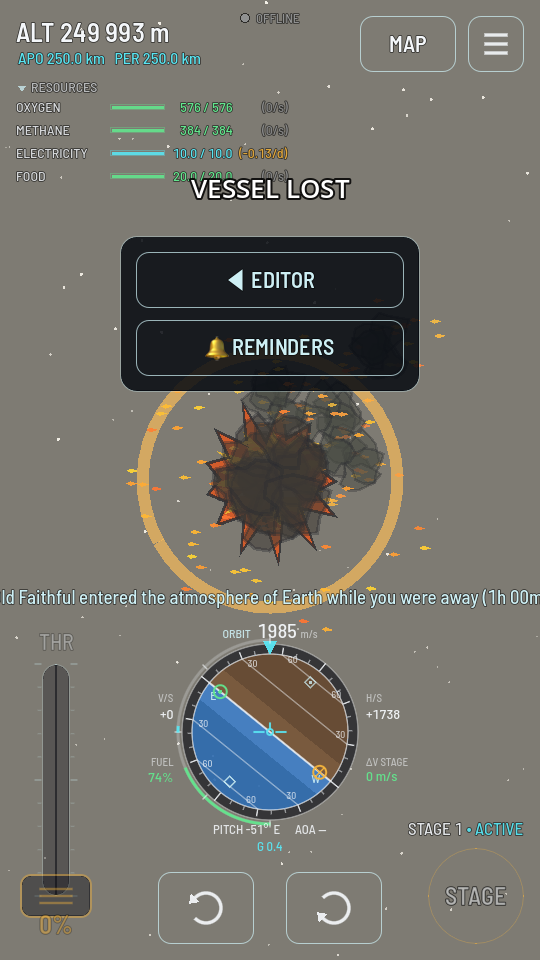
The wreck is real. There is nothing to undo and no way back to the moment before it, because the shared world has no rewind. The menu offers two ways on: EDITOR, back to the hangar, and REMINDERS, which is how you avoid the next one.
Ships you leave behind
A ship you stop flying does not vanish. It stays in the world on the path you left it on, listed on the map with the rest of your fleet, and you take it up again with the map's CONTROL chip. It ages exactly as the table above says: parked ships keep, coasting ships coast, and a coasting ship whose path dips back into the air is lost at the moment it gets there. If you happen to be flying something else when that moment arrives, a line on screen tells you that ship was lost.
So an orbit well clear of the air is a place a ship can be left for weeks, and a low one that grazes the air is a ship on a timer.
What a ship was doing goes on as well. Panels charge and batteries drain, a crew eats, a greenhouse grows, a Ground Imager photographs, and a Mining Rig left running on a deposit keeps filling its tanks: see Helium-3 and antimatter.