Set a reminder
Get told about an apoapsis, a burn or anything else on your own clock, whether or not the game is open when it happens.
You need this for anything hours away that you would otherwise have to remember yourself: a capture burn tomorrow, an apoapsis while you are asleep, a transfer window next week.
Steps
- About a point on your trajectory: tap it on the map. This works for an apoapsis, a periapsis, an atmospheric entry or exit, a ground impact, or a sphere crossing. Then tap REMIND ME under its card.
- About a maneuver burn: select the node on the map, then tap REMIND ME in its panel.
- About nothing in particular: open the reminders list. Use the flight menu's REMINDERS chip, or Open on the Your reminders row of the Settings screen the hangar's user button opens. Tap + Remind me later. Type a note if you want one; leaving it blank just calls it "Reminder".
- Pick how far ahead. The sheet lists a choice of leads before the event, or delays from now for the "later" flow. Each row shows the clock time it lands on. Tap one to set it.
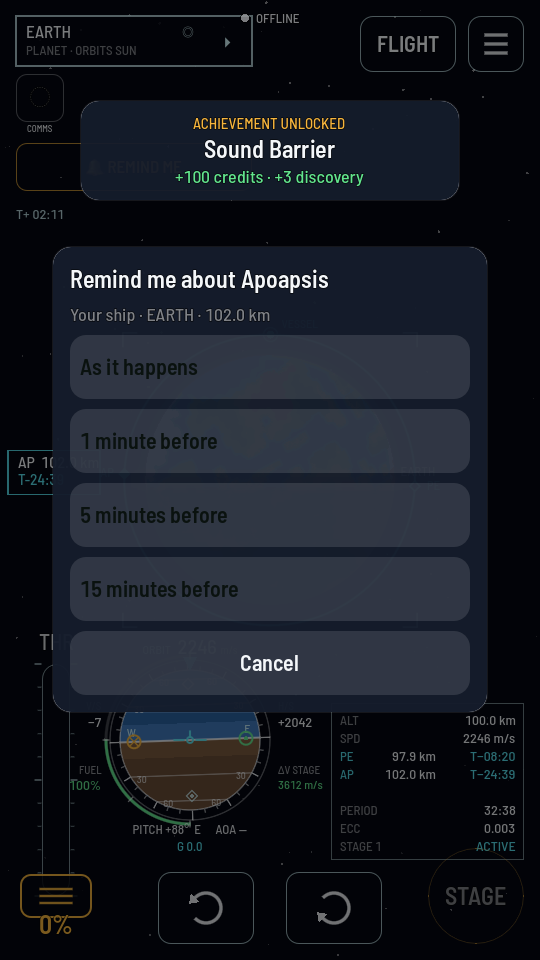
Pick how much warning you want. In the shared world each choice also shows the time of day it lands on, so "15 minutes before" is never a guess.
What you should see
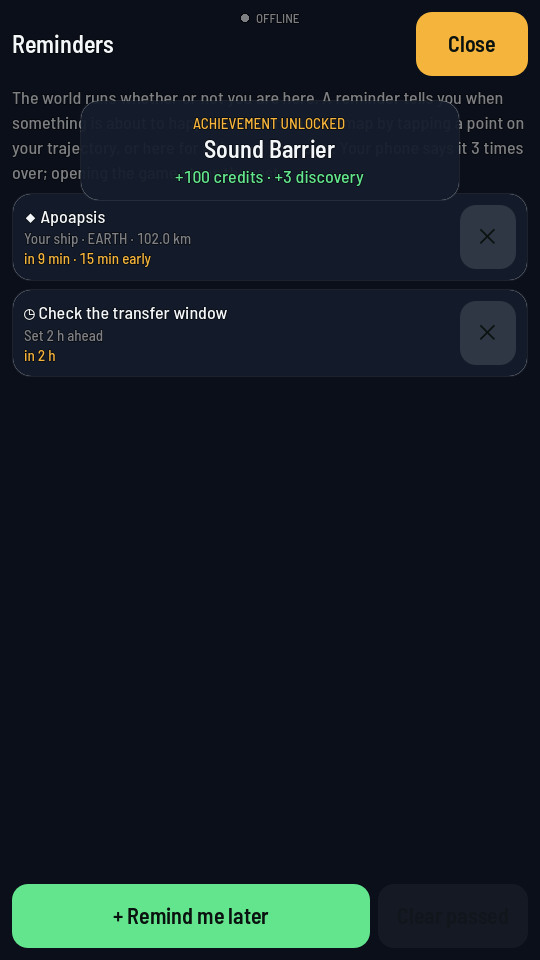
The reminder appears in the Reminders list with a countdown and, when you picked a lead, how early it will speak. When the moment comes the game says it once in a toast; in the shared world your phone repeats it three times over even with the game closed, and opening the game again is what stops the repeats. A reminder about a ship takes you to it when you tap the toast or the notification (how).
Heads up
Sandbox has no clock your phone can be told about: a reminder set there only speaks while the game is open. Dragging a node after setting a reminder on it does not move the reminder. It keeps the moment it was set for, like a calendar entry.