Check the About list
Find out which build you are running and whether the game is talking to the shared world, in the rows at the bottom of Settings, and write to us from the last one.
You need this when something looks wrong and you are about to say so, and whenever you want to know whether the last thing you did actually reached your account.
- Do it from the hangar. Settings is not reachable in flight.
Steps
- Open Settings. Tap the small figure at the foot of the hangar's parts column, below the palette.
- Drag the list to the bottom. ABOUT is the last section, at the foot of the list.
- Read the rows. Each one names something on the left and answers it on the right.
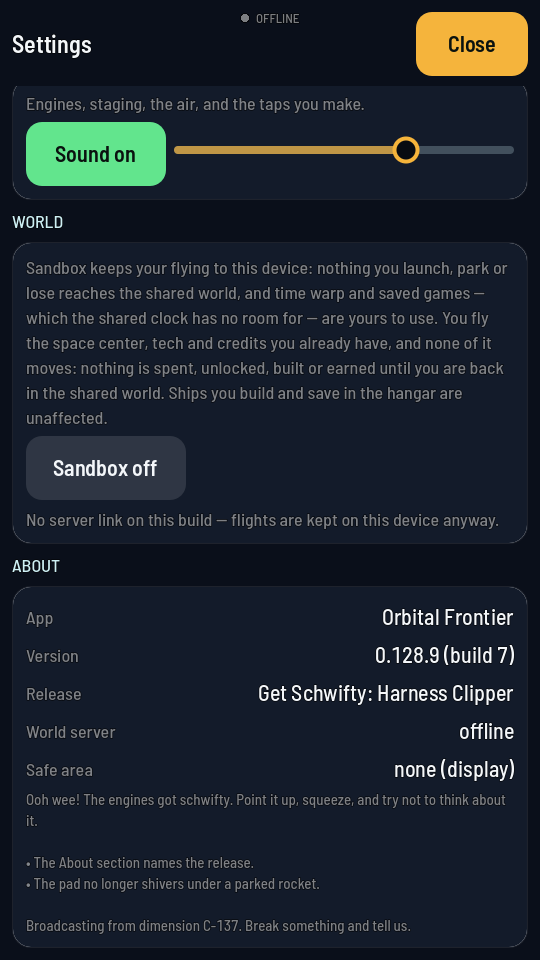
The rows, with the build's own release notes printed under them.
What you should see
| Row | What it tells you |
|---|---|
| App | The game's name. It never changes. |
| Version | The build you are running, with its build number and its API version in brackets, such as (build 76, API v1). The API version says which edition of the link to the shared world this build speaks. This is the line to quote when you report anything. |
| Release | The name that build shipped under. A build made outside a release says so instead. |
| World server | Where the game is pointed: the address of the shared world when it is connected, sandbox while sandbox is on, or offline when it has nothing to talk to. |
| Safe area | How much of the screen your phone keeps for its notch and its home bar, so nothing is drawn under them. none on a display with neither. |
| Contact | Our email address, [email protected]. Tap it and your phone’s mail app opens a new email to us with the address filled in. A phone with no mail app copies the address instead and says so under the row, ready to paste into any email. |
Under the rows, on a build that shipped as a named release, is that release's own note about what changed in it.