Lesson 11: Worlds, their pull, and the Moon
Every world owns a bubble of space around it. Going somewhere else means stretching your orbit until it reaches into somebody else's bubble, at a moment when that world is actually there.
The idea
Earth pulls on you. So does the Moon, and the Sun, and everything else. Working out the sum of all of that at once is a nightmare, and the game does something simpler and truer to how spaceflight is actually planned: at any moment, one world is in charge of you, and it is the nearest one whose pull wins.
The region where a world wins is its sphere of influence, and the map draws it as a dashed ring. While you are inside Earth's ring you orbit Earth. Cross into the Moon's ring and the Moon takes over: the map redraws your whole path around the Moon, and from then on the Moon's ground is what you can land on and the Moon's gravity is what you are fighting.
Nothing happens to the ship at the crossing. It does not bump or slow. Only the bookkeeping changes, the way a boat passing from one country's waters into another's keeps sailing exactly as it was.
| Thing | Figure |
|---|---|
| Earth's sphere of influence | 84,220 km |
| The Moon's distance from Earth | 12,000 km |
| The Moon's own sphere | 2,430 km |
| The Moon's pull at its surface | 1.63 m/s² |
| Circling speed just over the Moon | 557 m/s |
Look at those last two. The Moon pulls a sixth as hard as Earth and you only need a quarter of the speed to circle it. That is why a small lander does there what a whole rocket has to do here, and why the hard part of a Moon trip is Earth, not the Moon.
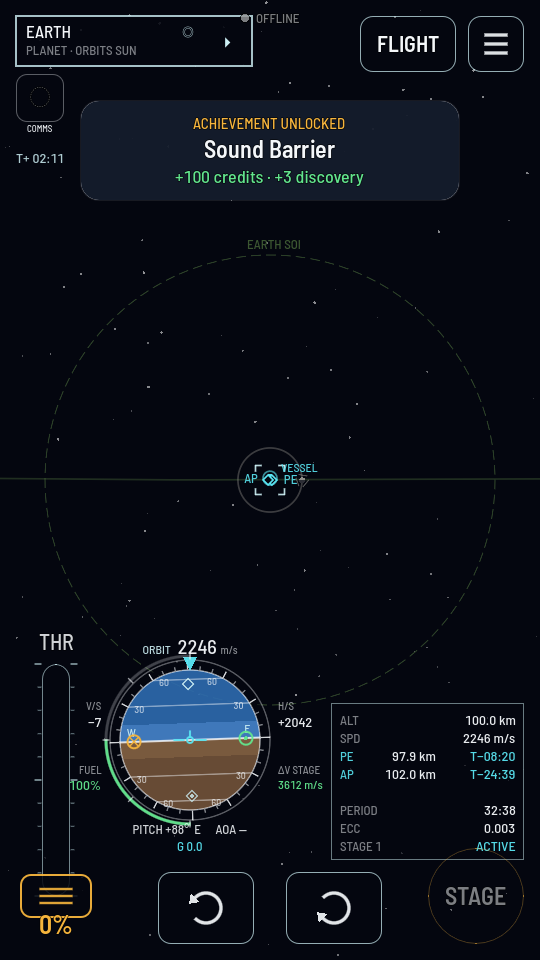
You aim where it will be, not where it is
Passing a ball to somebody running is the whole skill. You do not throw it at them, you throw it ahead of them, because by the time the ball arrives they have moved. The Moon goes right round Earth while you are on your way to it, so you stretch your orbit out to meet its path at the spot it will be in when you get there.
You do not have to work that out. You plan the burn on the map as a maneuver node, push the plan outward until its far end touches the Moon's path, and then slide the node around your orbit until the Moon lines up with it. The moment the timing works, the game marks the meeting on your planned path and names it, and that marker is how you know you have a trip rather than a long lonely ellipse.
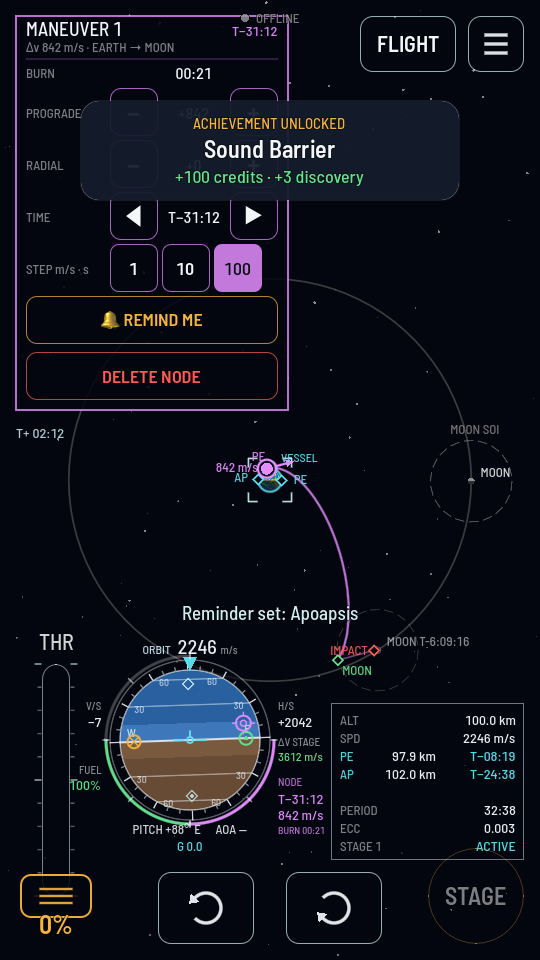
What it costs, and what it costs in time
Every trip is priced in Δv from Earth's pad, and the prices only get bigger:
| As far as | Δv from the pad |
|---|---|
| A stable orbit of Earth | 3,104 m/s |
| Orbit of the Moon | 4,272 m/s |
| Standing on the Moon | 4,863 m/s |
| Standing on the Moon, then home | 5,766 m/s |
| Standing on Mars | 6,048 m/s |
Notice how little of the bill is the Moon itself. Getting off Earth is 3,104 of it. Everything after that is comparatively cheap, which is the single most encouraging fact in spaceflight.
The other cost is time, and this game charges it honestly. The world runs on one clock that never stops, not when you close the game and not when you put the phone down. A coast out to the Moon takes hours of real time. You are not expected to sit and watch it: the map lets you tap REMIND ME on the point you care about, and the game tells you when it is due, even if the game is shut.
Try it: reach out and touch the Moon's path
You need a ship in a stable orbit of Earth with fuel left. Sandbox is ideal, and you can speed the clock up there instead of waiting.
- From orbit, open MAP and zoom out until you can see the Moon and the dashed ring it carries with it.
- Plant a maneuver node on your orbit line: hold your finger on the line until the ring closes. The panel opens with PROGRADE and RADIAL rows. Plan a maneuver node has the controls.
- Add prograde until the plan reaches the Moon's path. Tap + beside PROGRADE, with the STEP chip on 100 to begin with and then on 10 to fine-tune. Watch the violet planned line grow out of your orbit. Nothing has happened to your ship yet: this is only a plan.
- Now slide the node around the orbit with the TIME row, and watch the Moon. When the timing lines up the planned path picks up a marker at the Moon and the panel names the crossing. That is the ball arriving where the runner will be.
- Fly it, or do not. Either burn the node and earn Lunar Visitor, worth 1,500 cr and 40 discovery, or delete the node and keep the fuel. Planning it is the part that teaches you the lesson. The whole flight, landing included, is Landing on the Moon.
What you just proved
- One world is in charge of you at a time, and its dashed ring is the boundary.
- A crossing changes nothing about the ship, only which world your path is drawn around.
- You aim at where a moving world will be, and the map's marker is what confirms you got it right.
- Getting off Earth is most of the bill for anywhere. The rest of the solar system is a series of smaller pushes and a lot of patience.
The words
- Sphere of influence
- The region around a world where that world's pull is the one that counts. Drawn as a dashed ring.
- Transfer
- An orbit stretched to reach from one world's neighbourhood to another's.
- Maneuver node
- A planned burn placed on the map, which draws the path it would give you before you fly it.
- Encounter
- The marker the map puts on your path where it will meet another world or ship.
- Capture burn
- The burn that slows you once you arrive, so the new world keeps you instead of waving you past.
Where to go from here
That is the syllabus. You now know what every number on the flight screen means, why rockets are built in stages, what an orbit is and how to get into one, and what it takes to reach another world. Everything after this is practice and bigger rockets.
The guides are the next step: Reaching orbit, Coming home from orbit, Landing on the Moon, and From the pad to Mars for the whole programme in order. When something surprises you, the pages under How the game works explain it, and the FAQ answers the questions everybody asks.