Lesson 2: Thrust, weight and TWR
A rocket leaves the ground when its engine pushes harder than the world pulls. That contest has a score, the hangar prints it, and below 1.0 nothing happens at all.
The idea
A rocket engine throws mass out of the back very fast. Throwing something backwards pushes you forwards, exactly as stepping off a skateboard sends the skateboard the other way. That push is thrust, measured in kilonewtons (kN), and it does not need anything to push against. That is why it works in space.
So on the pad there are two forces and they are pointing opposite ways: thrust up, weight down. All that matters is which is bigger, and by how much. That comparison is the thrust-to-weight ratio, or TWR. Divide the push by the pull:
- TWR below 1.0 and the rocket stays on the pad, burning fuel, going nowhere. It is not broken. Its engine simply cannot lift what you built.
- TWR exactly 1.0 and it hovers, wasting everything it has.
- TWR 2.0 and it leaves briskly: half the push holds the ship up and the other half is what actually accelerates you.
Think of carrying a heavy bag up a staircase. Your legs are the thrust and the bag is the weight. Your legs have to carry the bag before a single step happens, and only the strength left over gets you up the stairs.
Bigger is not always better
A very high TWR is not free. A rocket that accelerates hard low down is a rocket ramming thick air at high speed, and the air makes you pay for that in drag and in heat (lesson 9). A rocket that accelerates slowly spends longer hanging in the air with gravity nibbling at it. Somewhere in between is right, and the way to find it is to fly.
The starter rocket leaves the pad at 3.0. The two-stage rocket in Reaching orbit crawls for its first few seconds instead, because its full-length tank is heavy and its one engine is exactly the same engine. Both work.
Where the game says it
The hangar shows you this three ways at once.
- The readout along the top gives Mass, TWR and Cost. The TWR counts only the engines your first engine stage lights, each at its Max power setting, against the whole rocket's weight: an engine higher up the stack pushes nothing until its own stage fires. A rocket with no stages at all lights every engine at launch, so then they all count. With no engine on the ship, the middle figure reads no engine instead, and if the ship has stages but none of them lights an engine it reads unstaged.
- The arrows on the rocket. The magenta one, labelled thrust, grows out of the point the first stage's engines push from (the same engines the TWR counts). The yellow one, labelled weight, hangs down from the centre of mass. They are drawn on the same scale, so you can see the ratio: at the starter rocket's TWR the magenta arrow is nearly three times the yellow one. Add fuel and watch the yellow one catch up.
- The full breakdown. Tap the readout strip and a card called Your ship opens under it: parts, mass, dry mass, height, the stage the ship lifts off on, that stage's thrust, thrust to weight, fuel and cost. Another tap closes it.
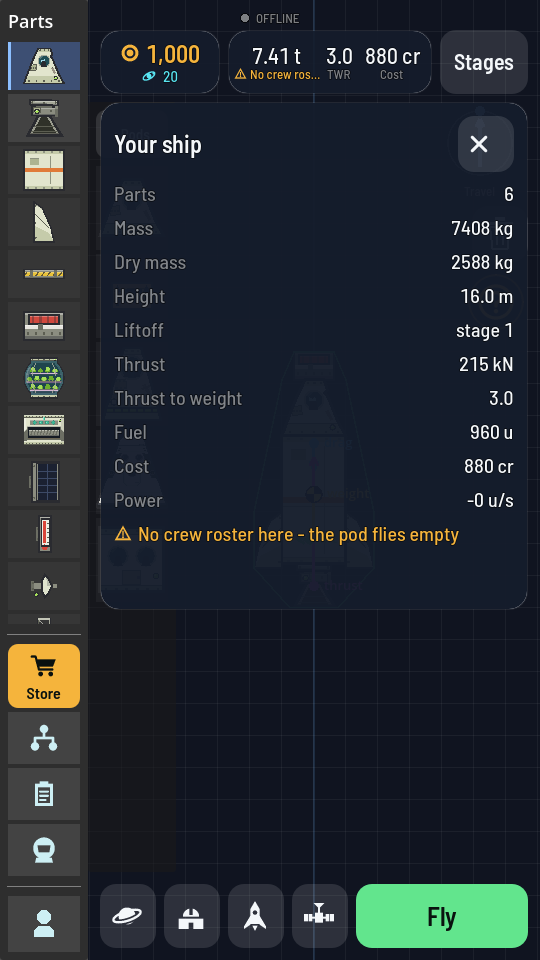
The engine's own figure is on its info card, and there are two of them: the Engine makes 215 kN at sea level and 250 kN in vacuum. Thin air lets a bell push harder, so your TWR quietly improves all the way up. The hangar's figure is the one at the pad, which is the one that decides whether you leave it. Once you are flying, the Map has the figure for where you are: select your ship and open its card, and the TWR line under the mass is the stage you are on now, in the air you are in and the gravity of the world below. It climbs as the fuel burns off, changes when a stage drops away and the next one takes over, and on the Moon the same stage reads about six times what it would on Earth.
Try it: make the arrows fight
All in the hangar, no launch needed until the last step.
- Start from the starter rocket and read the top strip. Note the Mass and the TWR.
- Tap the Fuel Tank to select it, then tap it again. Its properties sheet opens with a Length slider.
- Drag Length up slowly and watch three things move together: the mass climbs, the yellow weight arrow gets longer, and the TWR falls. The magenta thrust arrow does not move at all. You added fuel, not engine.
- Keep going until the warning appears. A line shows up under the mass reading: Too big for the pad. Your first Launch Pad takes 12.0 t and 20 m, and you have just gone past one of them. Back the slider off until the warning clears.
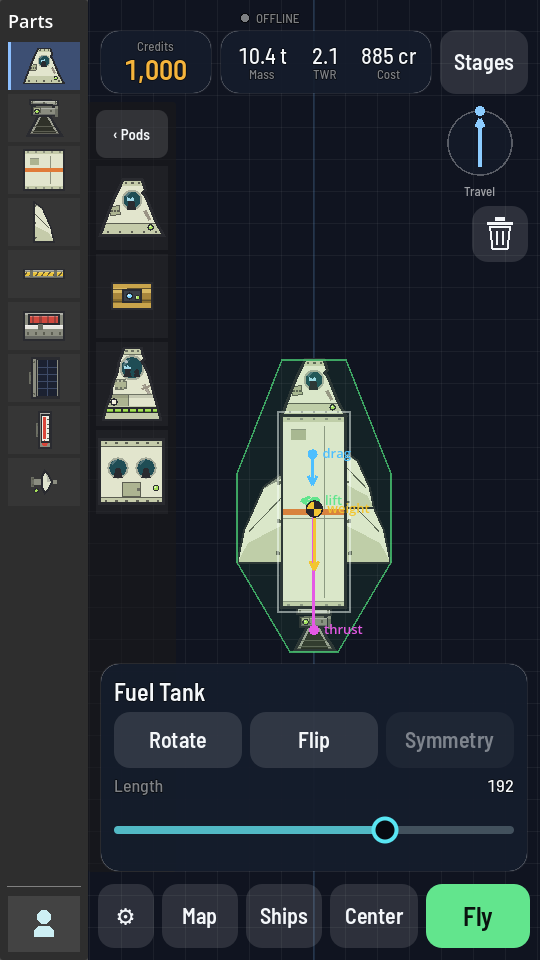
A longer tank. The figures along the top rise with every notch. - Fly this heavier rocket straight up and compare it with the flight you did in lesson 1. It leaves the pad more slowly, it takes longer to get going, and it burns for longer. Note the highest ALT it reaches.
- Compare. The heavier rocket carries more fuel, so it usually gets higher in the end, but it wastes more of that fuel just holding itself up on the way. That waste is what a low TWR costs you.
If it went wrong
The rocket sat on the pad with the engine running. TWR is under 1.0. Take fuel off with the Length slider, put a bigger engine under it, or check every engine at the bottom is in the first stage.
The pad refused the ship. The Launch Pad's sheet opens by itself and names what is over: the mass, the height, or both. Either build smaller or upgrade the pad (Upgrade a building).
TWR reads "no engine". There is no engine attached, or the one you placed is not joined to the stack. Drag it onto the bottom of the tank until it snaps.
What you just proved
- Thrust and weight are both forces in kN, and TWR is just one divided by the other.
- Adding fuel adds weight instantly and adds no thrust at all.
- A rocket needs TWR above 1.0 to move, and some room above that to move usefully.
- Thrust is not one fixed number: the same engine pushes harder as the air thins out.
The words
- Thrust
- The push an engine makes, in kilonewtons. Works in air and in vacuum alike.
- TWR
- Thrust divided by weight. Under 1.0 the ship cannot lift off.
- Dry mass
- What the ship weighs with every tank empty.
- Pad cap
- The heaviest and tallest ship your Launch Pad will accept at its current level.