Resize a tank
Stretch or shrink a Fuel Tank to carry exactly the fuel your rocket needs, without swapping it for a different part.
Use this when a Fuel Tank is holding too much or too little fuel for the engine above or below it, or when a ship is over the launch pad's height or mass limit and a shorter tank would fit under it.
Before you start
- A Fuel Tank is already on the canvas, on its own or as part of a stack.
- Tap the tank to select it, then tap it again. Its properties sheet opens at the bottom of the screen, titled Fuel Tank.
- Find the Length row. It shows the tank's current length as a plain number on the right, with a slider underneath.
- Drag the slider. Moving it right lengthens the tank, left shortens it. The tank grows or shrinks from the middle as you drag, and the number on the row updates with it.
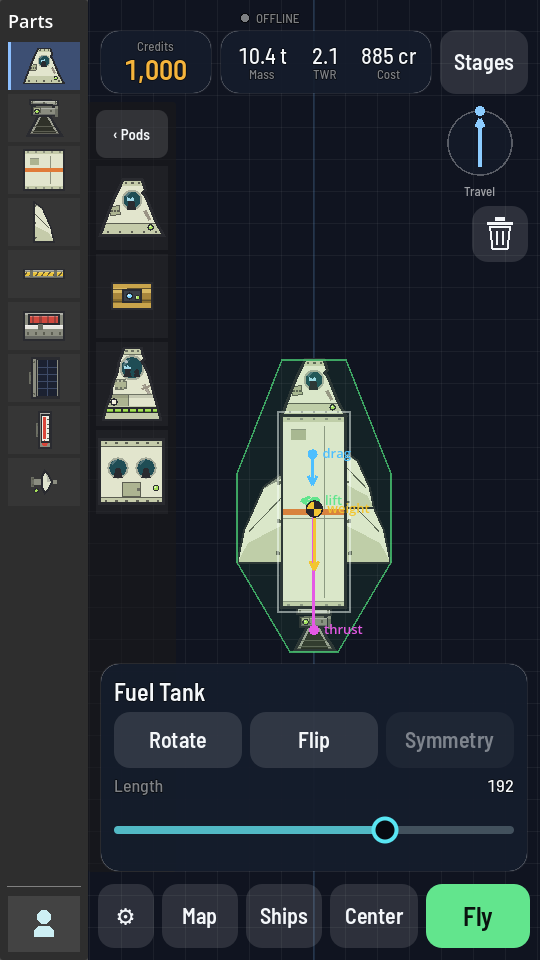
Length dragged up to 192; the tank's mass and cost readings along the top rise with it. - Let go once the tank is the length you want.
What you should see
The tank's picture stretches or shrinks in place, whatever is stacked on top or below it moves along with it, and the Mass and Cost figures along the top of the screen change to match: a longer tank weighs more, holds more fuel, and costs more.
Note
The Length row is the only way to change a tank's size. The slider's own ends are the shortest and longest the tank can go.