Mirror a part
Give a rocket a matched pair of fins, boosters or wings on either side, linked so that moving, resizing or deleting one carries the other with it.
Use this whenever a ship needs the same part twice, evenly either side of its centre: a pair of fins, radial boosters, or landing legs.
Before you start
- The part is already placed, hanging off the side of another part rather than sitting on the ship's own centreline.
- It has no mirrored twin yet. What hangs off it may already have its own: a booster's pair of fins comes across as a pair.
- Tap the part to select it. Four buttons marked with pictures appear at the bottom right, over Fly: rotate, flip, symmetry and lock. (Tap the part again and its properties sheet opens with the same four as Rotate, Flip, Symmetry and Lock; either set does the same.)
- Tap the symmetry button (a fin on each side), or Symmetry on the sheet. A mirrored copy appears on the opposite side of whatever the part hangs from, facing the right way with no further adjustment.
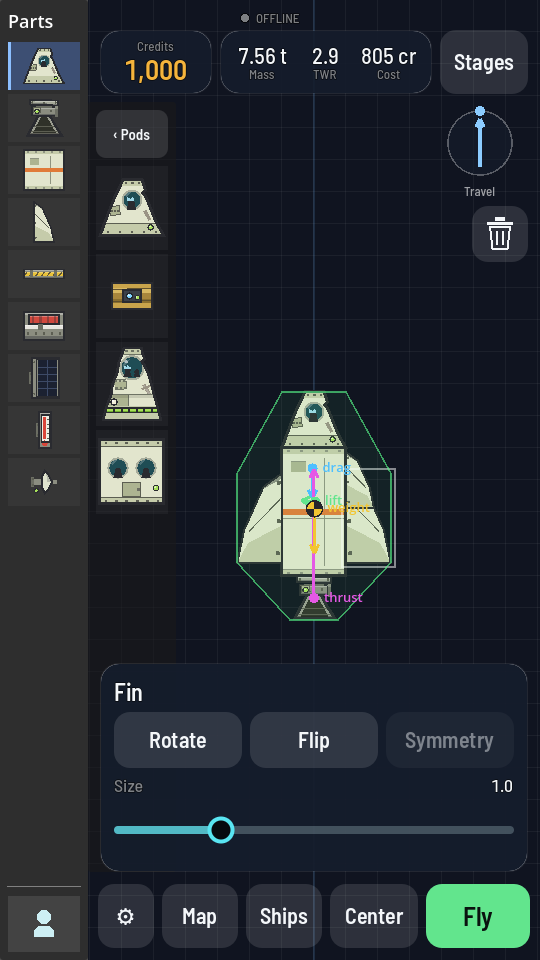
Symmetry is greyed out here because this fin already has a linked twin. The starter rocket's two fins are joined exactly this way.
What you should see
Two copies of the part now sit either side of the ship, and so does everything that hung off it: a Decoupler carrying a booster and its nose cone comes out the other side as a Decoupler, a booster and a nose cone. Move, rotate, resize or delete any one of them and its mirror image follows, because a symmetry link ties them together for as long as both exist. Symmetry greys out on a part that already has a linked twin. That is what it looks like on the starter rocket's own two fins.
Mirroring a mirror
Symmetry works at more than one level. Give a booster a pair of fins first (select one fin, tap Symmetry), then select the Decoupler the booster hangs from and tap Symmetry again: the other side of the core gets a Decoupler, a booster and a pair of fins of its own. All four fins are linked, so moving or resizing any one moves all four, and deleting one deletes all four. It works deeper too, a pair inside a pair inside a pair. The one thing Symmetry refuses is a part that is already mirrored about the very part it hangs from — there is nowhere left to put a second copy.
Keep building on one side
Once a pair exists you only ever have to work on one half of it. Anything you attach to one member of a pair is attached to the other at the same moment, as a linked pair of its own: drop a nose cone on the right-hand booster and the left-hand booster gets one too. Delete it from either side and both go.
That nests as well. Add a fin to one of a pair of boosters and both boosters get a fin; then select that fin and tap Symmetry, and all four fins stand — a pair on each booster, each pair linked about its own booster. So a ship is built and rebuilt on the right-hand side alone, and you never have to take a pair apart and mirror it again just to add one part to it.