Lesson 8: Which way am I pointing?
There is no up in space, so "which way is the ship facing" is a real question with an instrument to answer it. The navball is that instrument, and two little marks on it are what you actually steer by.
The idea
On the ground, directions are easy: down is where you fall, up is the other way, and north is north. In orbit none of that survives. You are falling all the time, in every direction at once as far as your stomach is concerned, and the world below you is turning.
What is left, and what matters, is the direction you are travelling. Everything a rocket does is described against that:
- Prograde means the way you are already going. Burn that way to speed up.
- Retrograde means exactly the opposite. Burn that way to slow down.
Those two words are the whole of steering in space, most of the time. Pointing prograde and burning raises the far side of your loop; pointing retrograde and burning lowers it. That is the swing rule from lesson 6, said in the words the game uses.
The navball
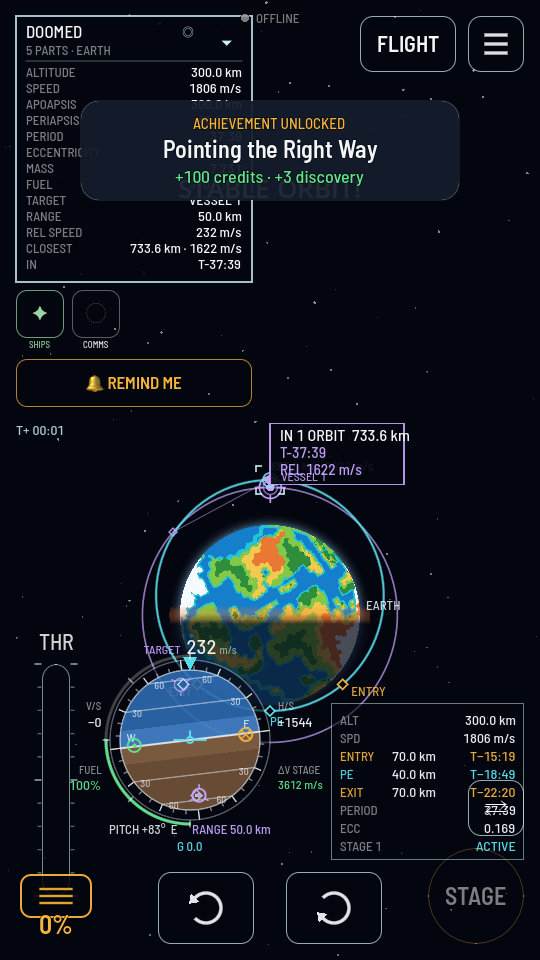
The ball in the middle of the flight screen is a model of the sky as your ship sees it: light on top for up, dark underneath for down, and it rolls as the ship turns. Your nose is always the mark at the top of the screen, so the ball turns under it instead of an arrow moving over it. It takes one flight to get used to and then you never think about it again.
Two marks are painted on it:
- A green mark where prograde is.
- An amber mark where retrograde is.
"Point at the green mark" and "point at the amber mark" is the instruction behind nearly every manoeuvre in the manual, and lining the nose up with one of them is most of what flying is.
One ship, three speeds, all true
Walk down the aisle of a moving train. How fast are you going? One mile an hour, if you ask the train. A hundred, if you ask the ground. Both answers are correct, and which one you want depends on what you are about to do.
Your ship has the same problem, so it has three answers. Tap the navball to cycle between them and the mode is written above the speed:
| Mode | Measured against | Use it when |
|---|---|---|
| ORBIT | The world's centre, ignoring the spin of the ground. | Any orbital burn. This is the speed an orbit is made of. |
| SURFACE | The ground right below you, spinning along with the world. | Landing, taking off, flying like a plane. |
| TARGET | Another ship you have picked out on the map. | Meeting up with something. Only offered once you have a target. |
The green and amber marks move when you switch, because "the way I am going" changes with what you measure against. Burning at the green mark in SURFACE mode and in ORBIT mode are two different burns.
What actually turns the ship
You press the two curved-arrow buttons at the bottom of the screen, and the ship uses whatever it has aboard to answer:
- Fins bite on the air, so they work during a launch and do nothing in space.
- A reaction wheel, built into the Command Pod, spins the hull against nothing at all. It needs electricity, not propellant, and it is what turns you in vacuum.
- An engine's gimbal swings the bell a few degrees while it burns, which is strong but only available with the engine lit.
- Thruster blocks puff propellant from wherever they are bolted, which is the precise way to turn a big ship.
You do not choose between them. The ship uses whichever of them it has, in whatever mix keeps the turn balanced.
Try it: three speeds and a backwards burn
- Before you launch, tap the navball. On the pad, SURFACE reads 0 m/s, because you are standing still on the ground. Tap to ORBIT and it reads the 174 m/s that the ground itself is doing, because the world is turning and carrying you with it. Nothing has moved. You changed the question.
- Launch, and keep the ball in view. Watch the green mark travel from straight up toward the horizon as your path bends over. That mark is your flight path, drawn for you.
- Get into orbit as in lesson 7, or load a sandbox save of a ship already up there.
- Now burn backwards. With the navball reading ORBIT, steer the nose onto the amber mark and hold the throttle open for a few seconds. Watch the other side of your orbit drop on the map. Keep going and it drops into the air, which is exactly how you come home. Coming home properly is lesson 10.
- Try it in SURFACE mode too while you are still in the air on a later launch, and notice that the two marks sit in different places. The faster you are going, the bigger that difference gets.
What you just proved
- Directions in space are named against your own motion: prograde with it, retrograde against it.
- The navball keeps your nose at the top and rolls the sky underneath it.
- Your speed is only a number once you say what it is measured against, and the game will give you all three.
- Steering is whatever the ship has: fins in air, a wheel and thrusters in vacuum, a gimbal while the engine burns.
The words
- Navball
- The ball in the middle of the flight screen: the ship's attitude against the sky.
- Prograde
- The direction you are already travelling. The green mark.
- Retrograde
- The opposite direction. The amber mark.
- Attitude
- Which way the ship is pointing. Nothing to do with where it is going.
- Reaction wheel
- A part that turns the ship on electricity alone, with nothing to push against.