Execute a maneuver node
Fly the burn a planned node asks for: point at its mark, light up in time, and stop the moment it is paid off.
You need this once you have a node planned and the time to fly it is close.
- You have a maneuver node planned. See Plan a maneuver node if you have not made one yet.
- You are back in the flight view, where the navball shows the node. Tap FLIGHT to leave the map.
Steps
- Watch the countdown. While a node is ahead, the navball carries a marker of its own on the ball, with NODE, a T− countdown, the Δv still needed and a BURN time printed beside it.
- Point the ship at the marker. Steer with fins, wheels, gimbal or thrusters, whatever the ship has, until the marker sits at the nose.
- Light the engine early, not at T−0. The BURN time is how long the throttle needs to stay open, so start roughly half of it before the mark: light up too late and part of the push lands on the wrong side of the plan.
- Hold the burn and watch it drain. The Δv and the marker shrink as you fly it off. Drift away from the marker and it swings to show whatever correction is left. Steer back onto it and keep burning.
- Stop when the marker is gone. The node retires itself once its Δv is spent, and the marker and its readout disappear with it. Cut the throttle there.
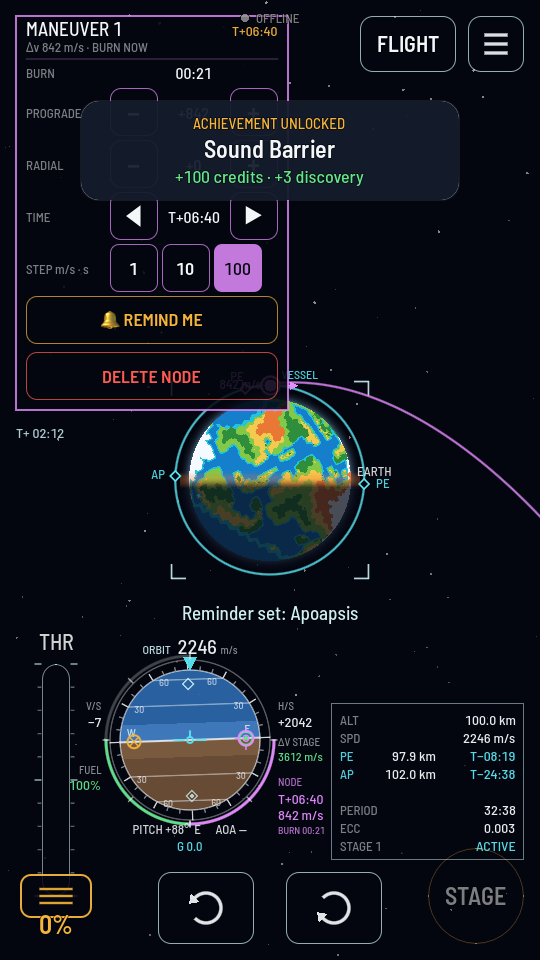
What you should see
As the burn pays the node off, the Δv gauge and the marker on the navball shrink together with your stage's fuel. Once both are gone the node disappears from the map and the ball alike. The burn is done.
Heads up
Running out of fuel partway through, or burning late, does not delete the node. It keeps whatever is left to fly and waits, reading that the burn is owed now, until you finish it or delete it from the panel.