Transfer crew between modules
Move a Meek out of one pod or cabin and into another, in flight — including from one half of a docked pair into the other, and, for an astronaut, across open space into a ship floating close by.
Use this to fill a lander before it drops away, to bring somebody out of a ship you are about to leave behind, or simply to move a passenger into the capsule with the view.
Before you start
- The ship has at least two crew modules — two pods, or a pod and a Passenger Cabin — or another ship with a pod or a cabin is close by (see Walk across to another ship). One pod on its own with nothing near has nowhere to send anyone, and offers nothing.
- There is a free seat somewhere other than where the Meek is sitting.
- Somebody is awake at the controls. A blacked-out crew cannot climb through a hatch, and nothing on the ship answers while the pilot is out.
Steps
- Tap the pod or cabin somebody should leave on the rocket. Its sheet opens, named for the part.
- Tap Transfer crew. The sheet closes and the ship itself becomes the chooser: the module you tapped is ringed in yellow, every module that can take the Meek in green, and every one that cannot — full, or out of reach — in red. The button is greyed while no move is possible.
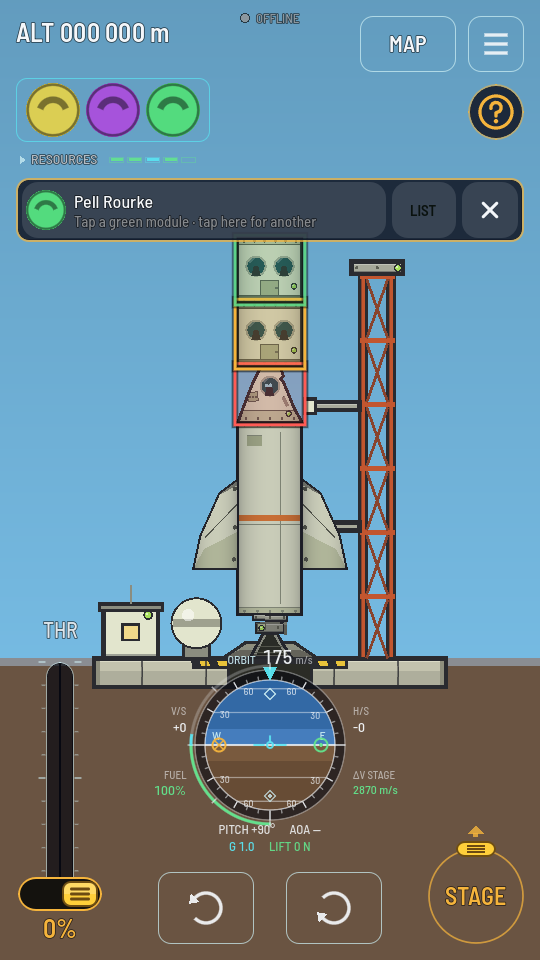
Moving out of the yellow cabin: only the empty green cabin above has room. - Check who moves on the bar across the top: their face and name. With more than one Meek in the module, tap the face for the next one. Somebody who has passed out is skipped.
- Tap a green module. They move there, the rings go away and a toast names the move: "Pell Rourke moved to Passenger Cabin 2". A tap on a red module says why it cannot take them and leaves the rings up; a tap on the yellow one, or on the cross, puts them away with nobody moved.
Tap an empty module instead and it works the other way round: the bar reads "Bring someone to …", and a green ring is a module with somebody who can come. Tapping it brings one of them over — a passenger before the pilot.
A module you cannot see — a ship too far off to be drawn, or scrolled out of view — is still on the list: tap LIST on the bar. It opens the Transfer crew sheet with the same Meek picked: WHO MOVES lists everybody aboard, MOVE THEM TO every module with what it has free ("2 seats free", "full", "here"), and a tap on a module with room is the move.
What you should see
The crew chip at the top left keeps the same faces — nobody has left the ship — but the weight has moved: each Meek weighs 80 kg, and the ship's balance shifts with them. Life support follows them too, since food and air are drawn per filled seat wherever the seat is.
Why a move can be refused
| What the toast says | What to do |
|---|---|
| "Somebody has to stay at the controls" | That Meek is the only astronaut in a pod, and moving them would leave the ship with a crew and nobody able to fly it. Move somebody else, or move a second astronaut in first. |
| "Passenger Cabin 2 is full" | Every seat there is taken. Move one of its passengers out first. |
| "Pell Rourke is out cold" | They are blacked out under the load. Ease off, wait for them to come round, and try again. |
| "out of reach (50 m)" | A walk to another ship: its module is more than 50 m from the Meek's seat. Close the gap. |
| "drifting 3.1 m/s - match speed" | The two ships are drifting apart too fast for anybody to step across. Bring the relative speed under 2 m/s first — the target chip reads it. |
| "only astronauts go outside" | Only an astronaut walks between ships. Dock the two instead, and anybody can cross the joint. |
| "not in the atmosphere", "not under thrust" | Nobody steps out in the air, or while either ship's engines burn. Get above the atmosphere and cut the throttle. |
| "Nobody would be at the controls over there" | They would be the only crew in a cabin of a ship with no astronaut in its pod. Put somebody at that ship's controls first. |
Walk across to another ship
An astronaut does not need a docking port. They can go out of the hatch and across open space into another ship floating nearby, and back again. While a ship of yours with a pod or a cabin is close — a station on its rails, a stage you dropped with a capsule on it — its modules are ringed too, green when in reach, and on the MOVE THEM TO list behind LIST, named with the ship, and each row says how far that module is from the seat of whoever you picked: "Passenger Cabin · Station" over "21 m · 1 seat free". The distances are live and change as the ships drift. A lone pod offers Transfer crew for this alone, and tapping the other ship itself opens its sheet, with how far away it is under its name and a Transfer crew button of its own.
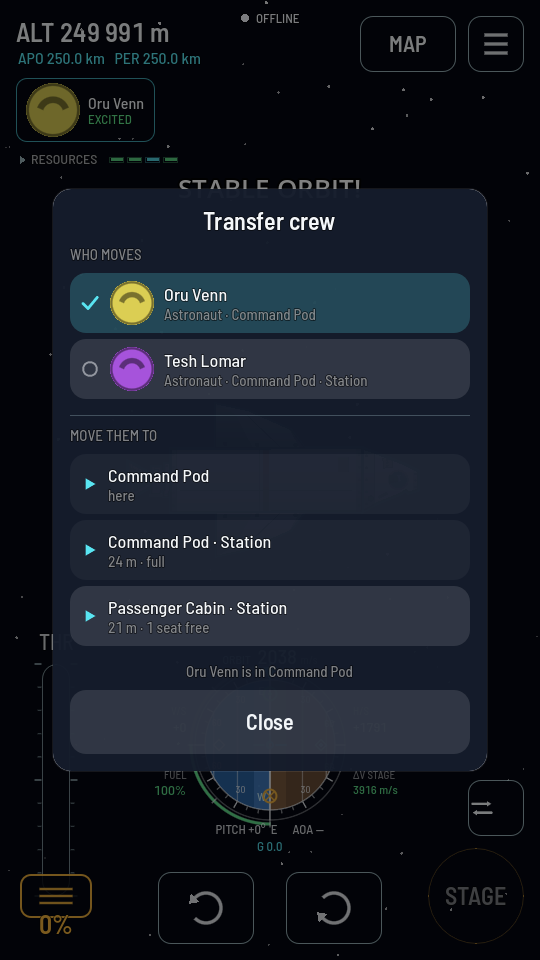
A walk across needs all of these:
- The Meek is an astronaut. Nobody else goes outside, so the other ship's scientists and passengers are not on the WHO MOVES list at all.
- The two modules are within 50 m of each other, hatch to hatch.
- The ships are drifting apart at under 2 m/s.
- You are above the atmosphere, or on a world with none, and neither ship's engines are burning.
- Both ships are left flyable: the last astronaut in a crewed ship's pod stays where they are, and nobody walks into a cabin of a ship with no astronaut at its controls.
Once across, they are that ship's crew: they eat from its larder and go wherever it goes. To fly the ship they walked to, tap it and use Take control.
Two ships, one list
After a docking, both ships' pods and cabins appear on the same MOVE THEM TO list, and two modules of the same kind are numbered — "Passenger Cabin 1", "Passenger Cabin 2" — so you can tell them apart. Move everybody where you want them before you cut the joint: once the halves are apart they are two ships again, and whoever is in the far half goes with it.