Skip a Programme mission
Pass over a mission in the chain for good, for nothing, and open whatever was waiting behind it.
You need this when the Programme is asking for something you do not want to fly — a mission you have effectively already done, or one whose rocket you have no interest in building. Skipping costs nothing at all: a Programme mission takes no advance, so there is nothing to take back.
- You are on the Space Center's board. The board you open in flight is read-only and has no button for this.
- The mission is a Programme one. Ordinary jobs are not skipped; an offer expires by itself and a job under way is given up for a price.
Steps
- Open the board. From the hangar tap the Space Center button (the dome), tap the Administration on Earth's strip, then tap Open contracts.
- Find the mission under PROGRAMME. Programme rows are the ones at the top, with a chapter line such as CHAPTER 3 · EYES AND EARS · STEP 4 OF 8 and a rail of dots under it instead of a company's name.
- Tap Skip on that row. Nothing is sent yet. The button turns red and changes to read Skip for good.
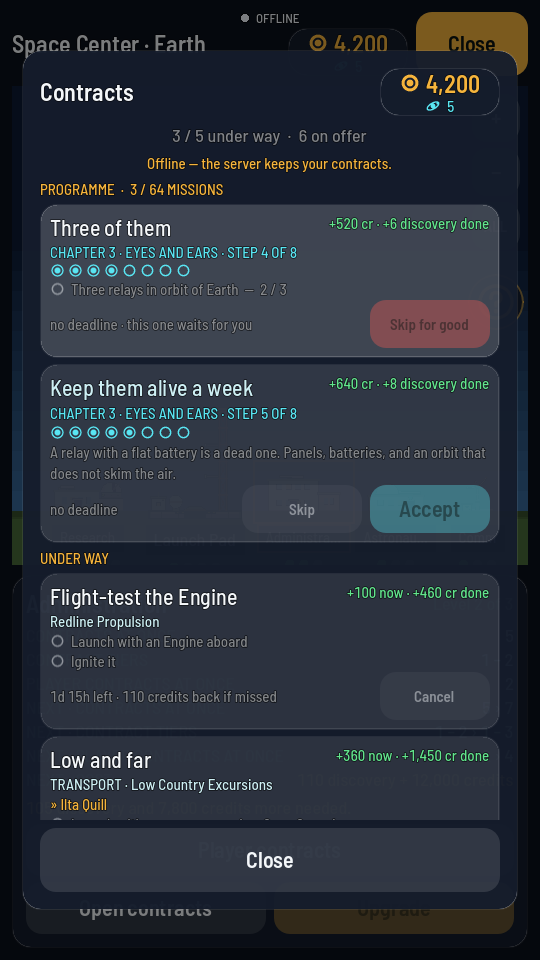
Armed. Tapping anywhere else on the board disarms it again. - Tap the red button again. It reads "Skipping…" while the game records it, then the row leaves the board.
What you should see
The mission disappears from PROGRAMME. The count in the heading — PROGRAMME · 3 / 66 MISSIONS — does not go up, because a skipped mission is not a finished one. In its place the next mission of that chapter appears, and anything that was waiting on the one you skipped is now offered exactly as if you had flown it. That is the point: nothing in the chain can leave you stuck.
Because the Programme runs two missions at a time, skipping one usually means the other chapter's next mission moves up beside the replacement.