Accept a contract
Take a company's offer off the board, collect its advance, and put its goals on the flight you are about to fly.
You need this before every paid flight: a contract counts only the goals your ship meets after it is signed, so signing comes first and flying second.
- You are in the shared world. In sandbox the board opens but nothing can be signed.
- You have a free slot. The Administration's level is how many contracts you may hold at once, and the line under the board's title says how many of them are taken.
Steps
- Open the Space Center. From the hangar, tap the Space Center button (the dome on the bottom bar). It opens on Earth, where the Administration stands.
- Tap the Administration on the strip. Its sheet opens below with its level and its figures. Drag the strip sideways if the building is off the edge of the screen.
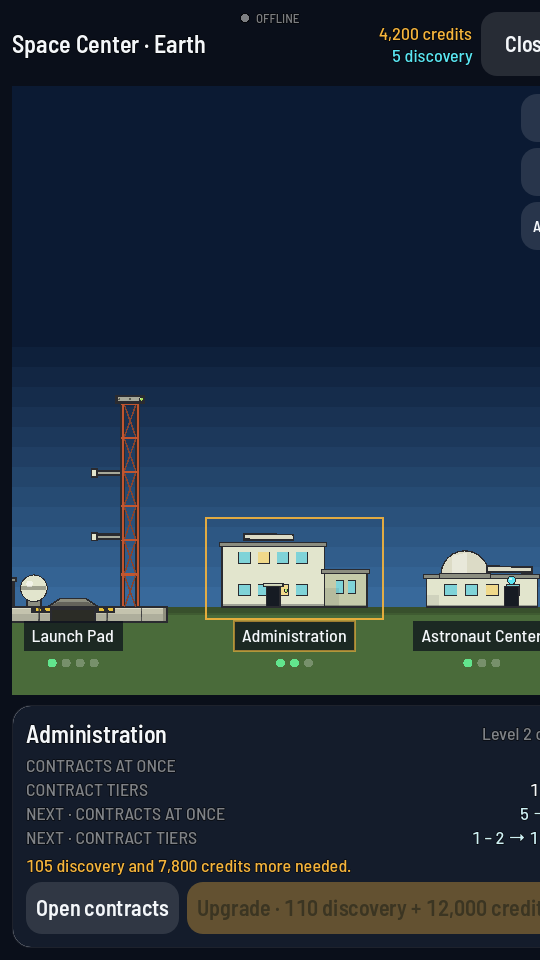
The sheet's bottom row: Open contracts on the left, the upgrade button on the right. - Tap Open contracts. The board opens over the Space Center.
- Find an offer under ON OFFER. Drag the list to scroll it. Each row gives the job's title, the company, the brief, what it pays now and on completion, how long the offer lasts and how long you would have to finish it.
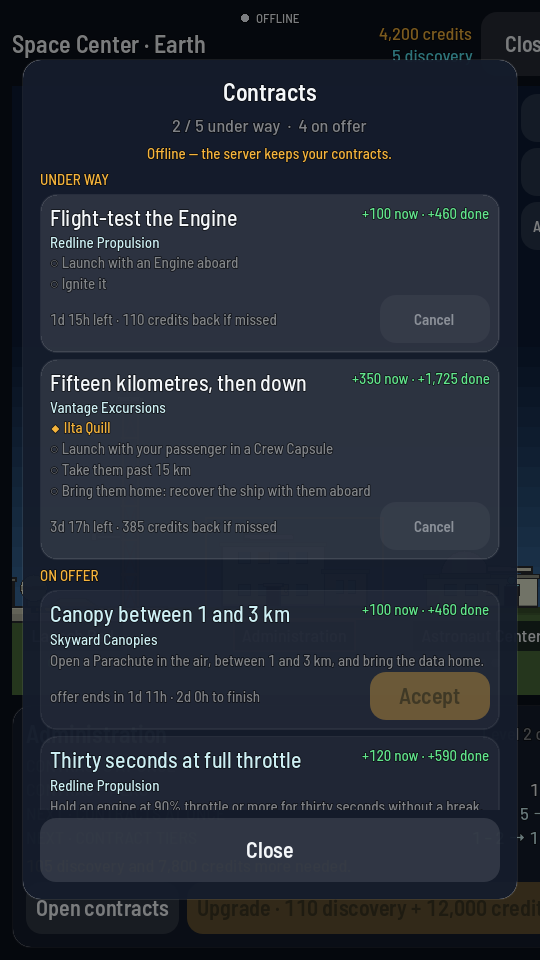
The amber Accept button sits at the bottom right of the offer's row. - Tap Accept on the row you want. It reads "Signing…" while the game takes it on.
- Tap Close. Then close the Space Center and build or pick the rocket that meets the goals.
What you should see
The row moves up under UNDER WAY, its goals listed underneath with an open circle each. The credits in the purse at the top of the board go up by the advance. The line under the row now counts down the deadline and names what the job costs you if you miss it. If the job carries passengers, their names appear on the row with a ◆ in front of them, and they are already on your roster.
An Accept button that will not press means there is no free slot, or the game cannot sign anything right now. The amber line under the board's title says which.