Load a cargo bay
Fill a Cargo Bay with the resources a trip needs — food, room for waste, or anything else — and choose how much of each.
Use this when a crew is going further than their pod's own larder reaches, when a long mission needs room for the waste the crew leaves behind, or when a ship needs a little of some resource it has no other part to carry.
Before you start
- A Cargo Bay is on the canvas. It is sold by the Logistics node on the tech tree.
- Tap the bay to select it, then tap it again. Its panel opens at the bottom of the screen, titled Cargo Bay.
- Set the length first with the Length slider, if the hold needs to be bigger. A longer bay holds more of everything and costs and weighs more empty.
- Tap a tile under Tap to load. Each tile is a resource, with its colour down its left edge. The tapped resource fills all the room the hold has left. If the hold is already full, it takes an equal share and the resources already in it give up room to make it.
- Drag a resource's slider to carry less of it. The line above the slider says how many units that is and what they weigh, and the bar under Cargo shows how much of the hold each resource takes. A slider can only go as far as the room that is free, so one resource never pushes another out.
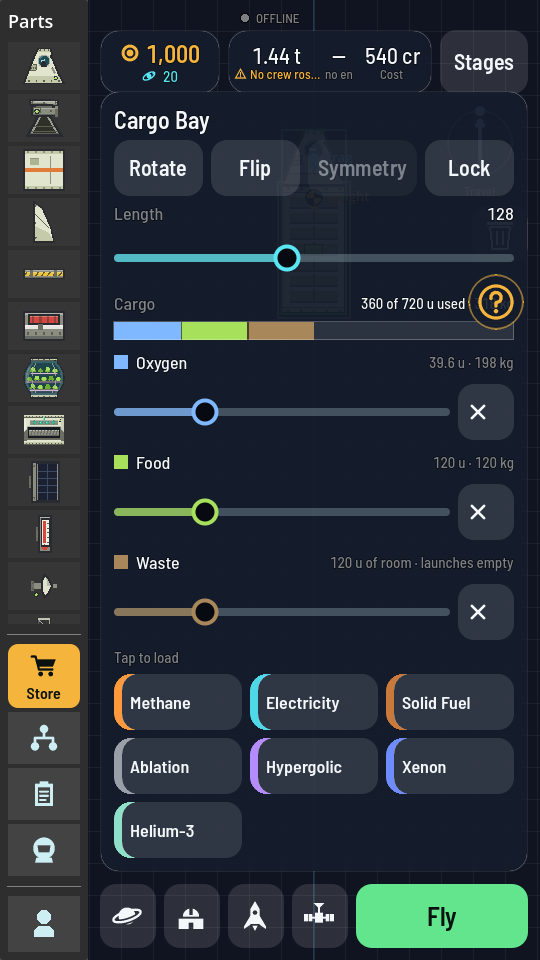
Oxygen, food and room for waste aboard, half the stretched hold still free. - Tap the × beside a slider to take that resource out of the hold altogether. Its tile comes back.
What you should see
The summary beside Cargo reads how much of the hold is used and what the load weighs, and the ship's mass along the top of the screen rises with it. Waste adds nothing: its line reads launches empty, because it is room for what the crew leaves behind, not a load.
Note
Resources pack differently: a unit of the hold takes a unit of food or waste but only a third of a unit of oxygen or methane, a tenth of a unit of hypergolic or solid fuel, and three tenths of a unit of xenon. Helium-3 is room that launches empty, like waste, and a whole bay keeps only 1.2 kg of it. Antimatter has no tile: no hold takes it. The Cargo Bay entry lists what a full hold of each comes to.
Careful
The hold is loaded in the hangar only. In flight a tap on the bay shows what is left in it, and nothing refills it.