Dismiss a Meek
Let a Meek go, so somebody else can take their place on the roster.
Use this when the Astronaut Center is full and the candidate you want is on the board.
Careful
Nothing comes back. The hire is not refunded, their stats are gone with them, and they will not reappear on the board. Let go of the Meek you would fly least.
Before you start
- You are in the shared world, not sandbox, and signed in.
- The Meek is on the ground. Anyone aboard a ship cannot be let go.
- They are one of yours. A passenger a contract lent you has no Dismiss button; they leave when the contract ends.
Steps
- Tap the Space Center button (the dome) in the hangar, then the Astronaut Center on the strip.
- Tap Open the Meek. The sheet opens on the Roster tab.
- Find their card and tap Dismiss. It sits on the card's foot line, beside the line that reads "On the roster".
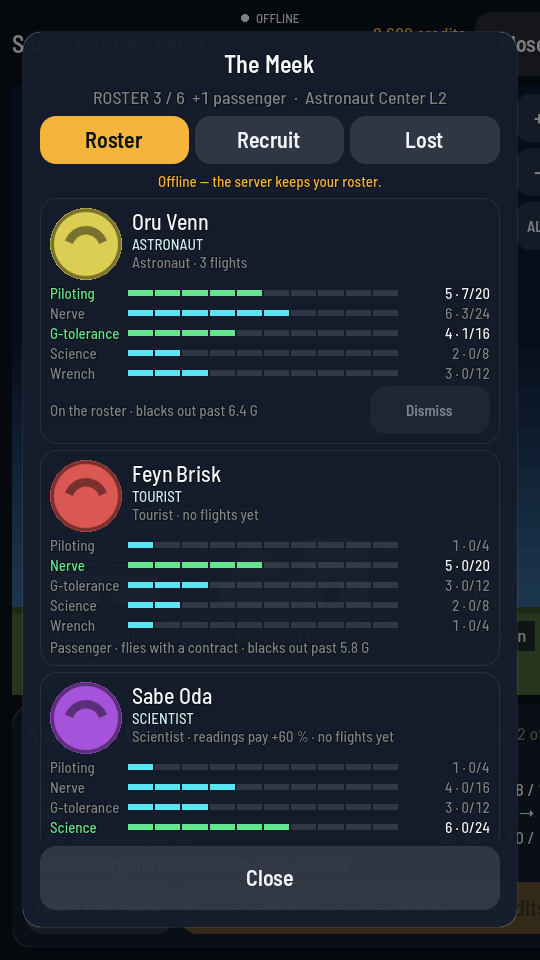
Dismiss is on the card's own foot line. The card below it is a passenger, and has none. - Tap it again. The button has turned red and now reads Let go · sure?. A second tap sends it; the button reads "Leaving…" while the game does it. Tapping anything else instead leaves them where they are.
What you should see
The card disappears from the roster and the count above the tabs drops by one. Your credits do not change. The Recruit tab will now let you hire.
Why Dismiss won't tap
| What you see | What it means |
|---|---|
| No Dismiss button at all | Either they are aboard a ship, in which case the foot line reads "Aboard" and the ship's name, or they are a passenger, in which case it reads "Passenger · flies with a contract". |
| "Offline — the server keeps your roster." | You are not signed in. Nothing can be changed until you are. |
| "Sandbox Meek live on this device: up to 5, signed on free, and one signs on for each one lost." | You are in sandbox, and this is sandbox's own crew, not your account's. See The Meek in sandbox. |
Note
A Meek aboard a ship that has landed on a world where you hold a pad has a Bring home button in place of Dismiss. That recovers them, which also grows their stats. Once they are home the Dismiss button is back.