Buy from or sell to another player's station
Pump a load out of another player's ship at their price, or into it for theirs, with the fee shown before you commit.
Before you start
- Your ship is docked with the other player's ship, and its owner shares its resources.
- Buying: you have the credits. The amount you can pick stops at what they pay for.
Steps
- Tap a store on your ship and tap Transfer resources, as in Transfer resources between stores.
- Pick the resource and the direction. Take in buys from their ship; Send out sells to it. Nothing crosses to another player's ship for free: only the resources their owner has priced are offered, and only the way they priced them. Pick them on the bar across the top, as in the steps linked above. On the sheet, a ship that does not trade the resource the way you picked is named in amber under the list instead: "Kestrel Depot does not buy methane".
- Tap one of their stores ringed in green — a red one says its owner does not trade the resource the way you picked — or tap LIST and pick it on the sheet, where their stores are named with their ship. The sheet opens on it. Three lines appear under the amount:
- the price a unit, set by its owner, and what your amount comes to;
- in amber, Fee 5%: what you pay on top, which goes to nobody;
- You pay or You get: the total.
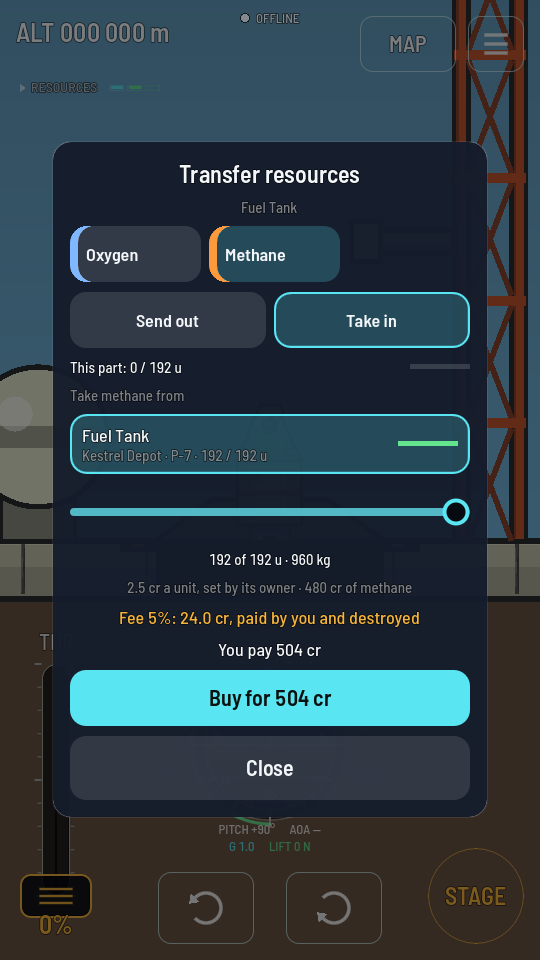
192 units of methane at 2.5 cr: 480 cr, plus a 24 cr fee. - Set the amount with the slider. The figures follow it.
- Tap Buy for … (or Sell for …). The world moves the load and settles the credits, and a toast says what it cost: "Bought 192.0 u of methane for 504 cr (fee 24.0 cr)".
How the fee works
Whoever asks for the move pays the fee: 5% of the load's value, on top of the price when you buy and out of the price when you sell. The station's owner pays no fee. The fee is not paid to anyone; those credits leave the game.
When it does not go through
| What the game says | What happened |
|---|---|
| "Not enough credits to buy any" | Your credits do not cover a single unit with its fee. |
| "Transfer refused: it is not for sale" | The owner has no sell price on that resource, or took it off, so it cannot be taken from their ship. |
| "Transfer refused: its owner does not buy it" | The owner has no buy price on that resource, so it cannot be pumped into their ship. |
| "Transfer refused: the price changed" | The owner changed the price after your sheet showed it. Pick the store again to see the new one. |
| "Transfer refused: its owner cannot pay for it" | Selling: the owner's credits do not cover a unit at their own price. |
| "Transfer refused: it sells at a price this build cannot show" | Your copy of the game is older than prices. Update it to trade with a priced station. |
When your credits cover only part of the amount, only that part moves and you pay only for it.