Post a player contract
Pay another pilot to put a ship in orbit, or land one, for you: the reward is set aside when you post, and the ship is yours when it is delivered.
- You are in the shared world, with the Administration at level 2 or higher.
- You have a free slot: you may post as many contracts at once as your Administration lets you hold.
- You have the reward in credits.
Steps
- Open the board. Space Center, tap the Administration, then Player contracts.
- Tap Post a contract. The posting screen opens in place of the board.
- Name it. Other pilots see the name, so it is checked like a ship's.
- Say where. Under The ship must, choose Reach an orbit, Land at a place or Carry a Meek. For a passenger, choose Who, one of your Meek, and To, where they go (Carrying a Meek). For an orbit, the world under Deliver to an orbit around is shown as its picture: tap it, or Choose another world, and tap a planet among the pictures. A planet with moons then shows itself and its moons: tap the one you mean. Then set the lowest and highest point the orbit may have. For a landing, pick the world the same way under Land on, then tap or drag round its picture to put the marker where the ship must stand: 0° is at the top, on Earth the launch pad, and At, round from the top moves with the marker for a finer setting. Within, either side is how far from it still counts.
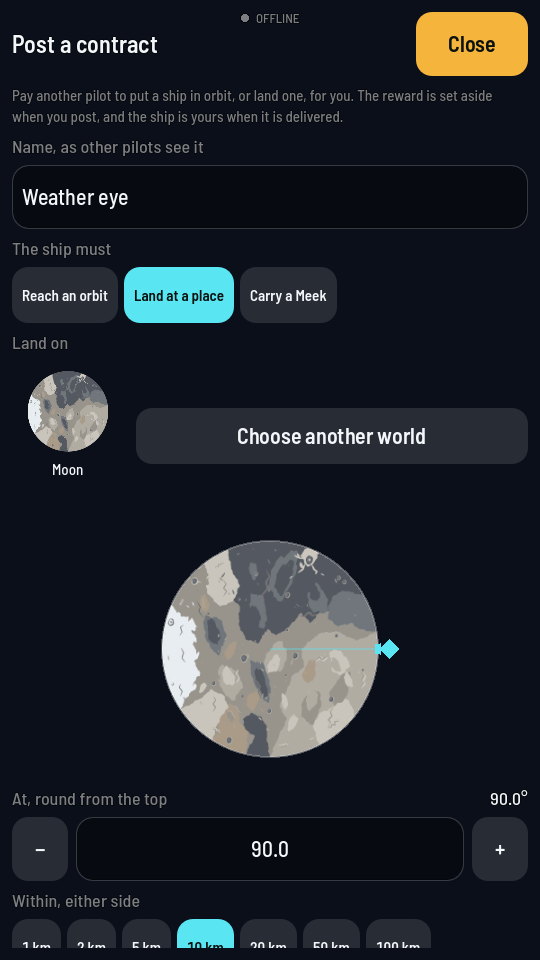
A landing's place, set on the drawing. - Say what the ship must carry. Add a part opens the parts you have unlocked as pictures: tap a category along the top, then the part; − and + set how many, Remove drops one. A resource aboard is optional: tap one of the resources under Ask for a resource aboard to ask for some.
- Set the pay and the time. The Reward slider stops at the cap: three times the launch of what you ask for to that place, plus its price. The line under it says what the cap is. Tap the penalty a taker sets aside, a share of the reward, then slide who may see the contract, how long it is open to take and how long a taker then has: each slider names the step it is on.
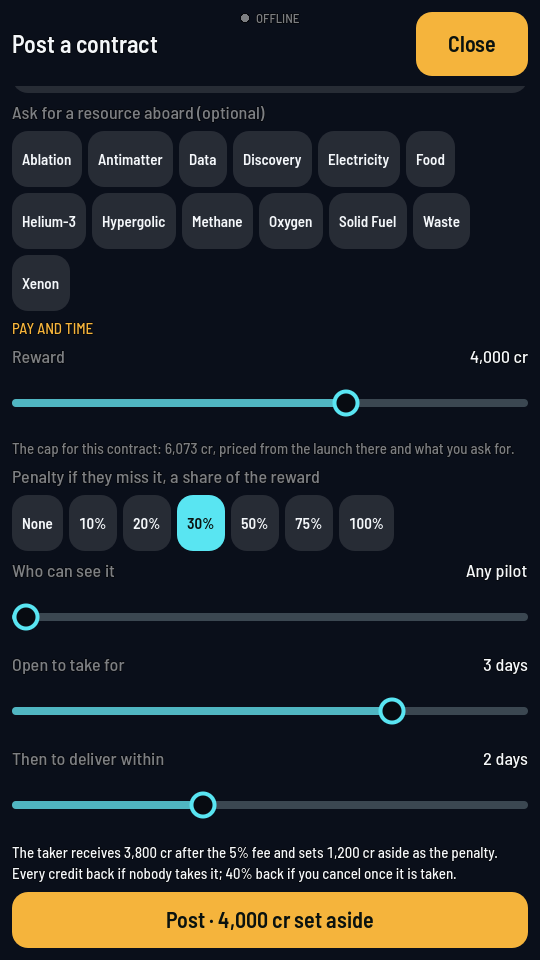
The foot of the form, Post under it. - Tap Post. It names the credits it sets aside. The board comes back with your contract under YOUR POSTS.
What you should see
Your credits go down by the reward, and the contract waits under YOUR POSTS with how long it has left to be taken. When a pilot takes it, the card says who: their tag, their rating and how many contracts they have delivered and failed. Withdraw gives every credit back while nobody has taken it; once taken, Cancel keeps you 40% of the reward. Both arm on the first tap and go through on the second.