Post a docking contract
Have another pilot bring a module to your station and dock it there: once it is docked and they are paid, the module is yours.
- You are in the shared world, with the Administration at level 2 or higher, and a free slot to post in.
- You are flying the ship that will receive the module, in flight rather than on the ground, and one of its docking ports holds nothing.
- You have the reward in credits, and the ship's cover for the contract's whole life where cover is needed.
Steps
- Tap a free docking port. Its sheet has Post a docking contract beside its own actions. A port that is holding something, or a ship on the ground, offers no such button.
- Tap Post a docking contract. The posting screen opens with your ship as the target, Dock to and its name at the top, and how many of its docking ports are free.
- Name it, and say what the module must carry. Add a part lists the parts you have unlocked, as for any contract; a docking port is a good first one.
- Set the pay and the time. The reward, the penalty, who may see it and the two clocks work as for any contract. The green line under the reward says what keeping the ship covered for the contract's whole life costs.
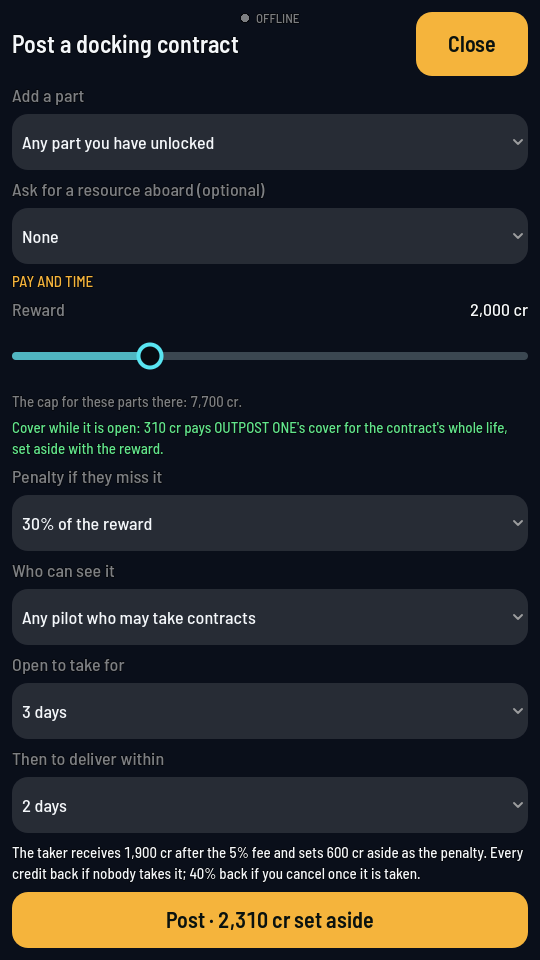
The foot of the form: the cover, and the Post button naming everything set aside. - Tap Post. It names the credits it sets aside, the reward and the cover together.
What you should see
The screen closes back to your flight, and a note says Posted with the credits set aside, the reward and the cover together. The contract is on the Player contracts board under YOUR POSTS, as Dock to your ship. While it is open or under way your ship stays open to other players, whatever its own switch says, so nobody who takes the contract finds it closed halfway; the cover you paid keeps it insured for that long.