Lock the throttle
Hold the throttle where it is, so a thumb that brushes it on the way to the map cannot light the engines.
You need this once a burn is done and you are coasting: the throttle sits in the lower left corner, right where a thumb lands to pinch or drag the map, and a slip there changes your orbit.
- You are flying and the throttle is on screen. In docking mode it is not, and neither is its switch.
- Someone aboard can work the throttle. While it is greyed, because the pilot is blacked out or a probe has lost its link, it ignores every touch, the lock's included.
Steps
- Set the throttle where you want it held. Usually 0%, after the engines are cut.
- Slide the yellow grip inside the throttle's handle to the left. The handle is a dark bar with an amber rim, and the grip, the yellow block with three bars on it, rests at its right end. Put your finger on it and slide it sideways; let go once it is past the middle. It clicks into place, the rim dims and a padlock shows in the space the grip left.
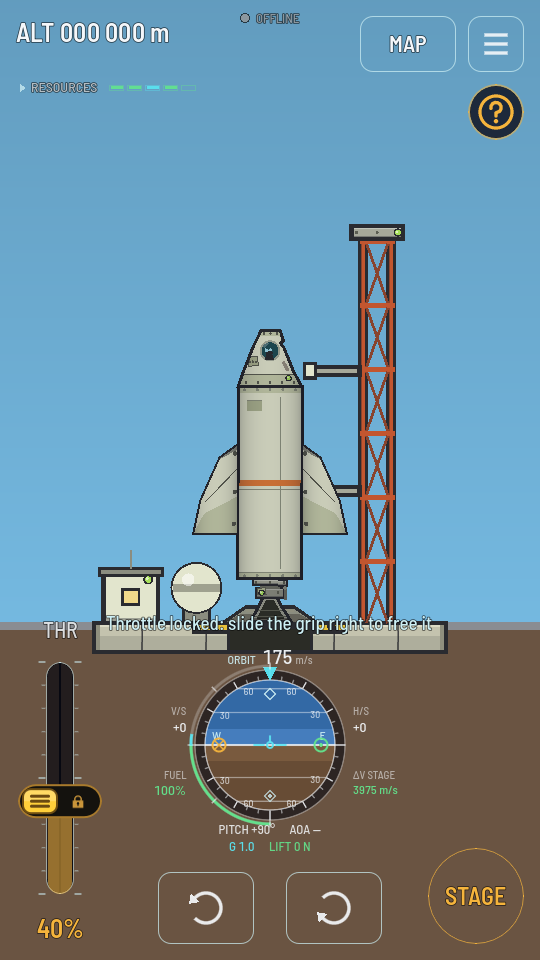
Locked: the grip at the left of the handle, and a padlock where it stood. - To free it, slide the grip back to the right. It clicks free, the padlock goes, the rim brightens again, and the throttle moves under your finger again.
What you should see
While it is locked, touching or dragging the throttle moves nothing, and a line above the navball tells you it is locked. Only a sideways slide of the grip past the middle of the handle changes it: a tap or a short nudge leaves it as it was, so the lock cannot be turned off by the same slip it guards against. Dragging the handle up or down, from anywhere on it, moves the throttle as it always has while it is free.
Heads up
The lock holds your finger, not the game. The throttle still moves on its own where it always has: it opens to full when the first stage lights on the pad, and it closes when you switch to docking mode. The lock itself stays until you take it off: it carries on to your next ship and your next flight, and it is still on after the game is closed and opened again.