Staging
One button fires your rocket a step at a time. The staging editor is where you decide what that button does and in what order, before you ever reach the pad.
Why a rocket needs staging at all
A rocket built of several engines and separators does not know on its own which of them to fire first. Without a plan, pressing the flight's STAGE button with nothing staged fires every engine on the ship at once. That suits the simplest rocket and nothing else: it is wrong for any ship with a spent tank to drop or a chute to save for the way down. The staging order is that plan, built once in the hangar and carried into the flight.
What a stage is
Open Stages in the hangar's top bar and the two columns down the left of the screen change job. The first, where the part categories were, becomes the stages themselves, numbered from 1 and each showing pictures of the parts it holds; the + tile under them opens a new one. The second, where the parts were, becomes the contents of whichever stage you tapped. The ship stays in full view the whole time, which is the point: you can see what you are staging.
Each stage holds any number of parts, and every part in it does one named thing the moment that stage fires: an engine ignites, a decoupler lets go, a parachute opens. To put a part in a stage, tap the stage in the first column, select the part on the ship, then tap the tile at the foot of the second column — it wears that part's own picture with a green + on it. Tapping it again, now a −, takes the part back out. The line under the ship names what the tile will do.
A stage is not limited to one part. Put an engine and the decoupler under it in the same stage and both fire together: the old stage falls away and the new one lights in the same instant, with no dead moment of coasting between them.
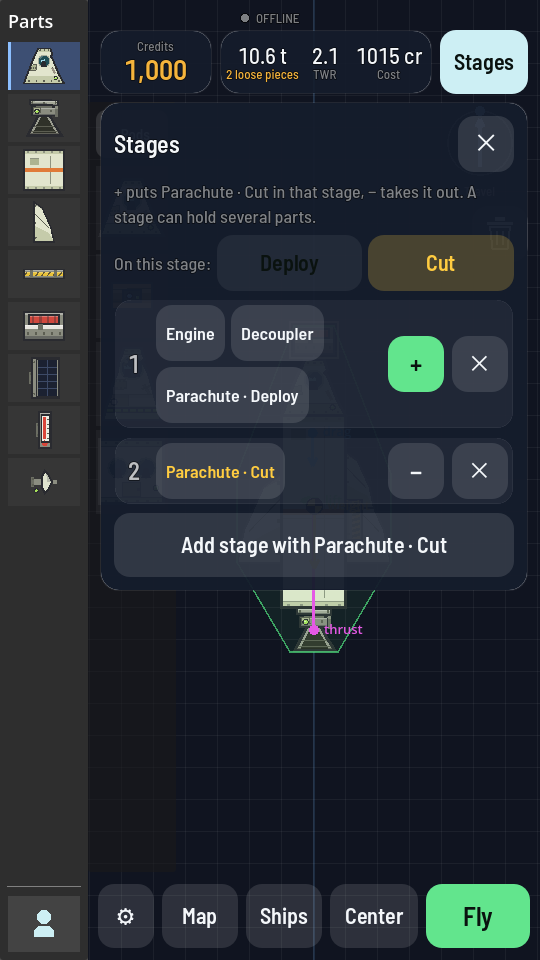
Order matters: the first press of the flight's STAGE button fires stage 1, the next press fires stage 2, and so on down the column. The ▲ and ▼ buttons at the foot of the second column move the picked stage in the firing order, not just on the screen, and the red ✕ under them removes it.
An engine must fire clear of its separator
An engine's bell is open at the bottom, and the only things that bolt under it are a Separator or a Decoupler — the joint to the stage below. While that joint is still there it sits in the flame. The moment such an engine really burns, lit with the throttle up and propellant reaching it, the engine and the part under it explode together, and whatever hung below falls away as wreckage.
So the separator under an upper-stage engine must fire no later than that engine lights. Put both in the same stage and it is safe: a stage lets go of its separators before any engine in it starts to push, so the engine lights with nothing under it. Staging the engine in an earlier stage than its separator — or launching a stacked rocket with nothing staged, which lights every engine at once — blows it up. A lit engine with the throttle at zero is not burning, and nothing happens until the throttle moves.
Check the staging
When you press Fly, the hangar looks over your engines first. If the staging looks wrong, a Check the staging sheet says what it found before anything leaves the pad:
- the ship has stages, but none of them lights an engine, so it will not leave the pad;
- an engine sits in no stage while the others are staged, so it will never light (escape and separation motors are left out of this one — you fire those when you want to);
- an engine would fire into the separator still under its bell, either because the separator is staged after the engine or because the rocket has no stages at all, so nothing fires the separator.
Check staging opens the staging list so you can fix it; Fly anyway launches the ship exactly as it is built. A rocket with no stages at all is fine as long as no engine has a separator under it: the launch lights every engine.
One part, several jobs, several stages
A part that can do more than one thing offers its actions as buttons at the foot of the second column. The Parachute offers Deploy and Cut. Whichever action is picked there is what + puts into a stage, so the same chute can sit in an early stage as Parachute · Deploy and a later one as Parachute · Cut, each tile carrying the action's word under its picture: one stage opens it, another cuts the canopy loose once you are safely down. A part can only sit in one stage per action, so it never fires the same thing twice.
Staging in flight
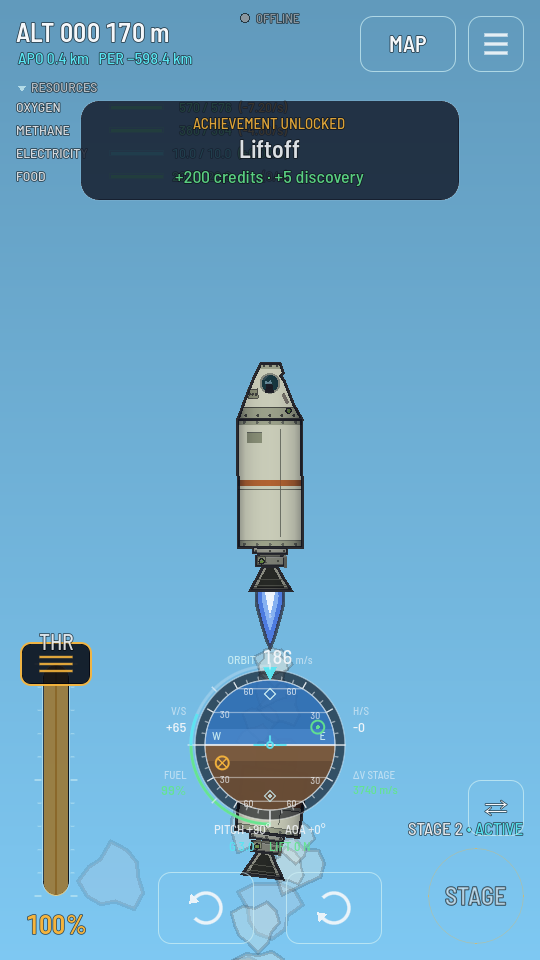
On the pad, the first stage is armed and everything else waits. Tapping STAGE fires the active stage and arms the next one; the flight screen names which stage is active so you always know what the button will do next. Once the last stage has fired there is nothing left to arm, and the button has nothing more to do.
A dropped stage keeps flying
Firing a decoupler does not delete whatever comes off. It becomes its own piece with nobody at the controls, still obeying gravity and the air. An engine still burning when its stage is dropped keeps firing until its tank runs dry, so drop a spent stage with its engine already idle or it will chase your ship up through the flame. A piece with no command part of its own is just debris; one that does have a command part can be switched to and flown.